Keyboard & Stylus
Best lightweight tablet with keyboard and stylus: Switching Between Handwriting and Drafting
Find a tablet setup for writing by hand, drafting with a keyboard and marking revisions, led by HUAWEI MatePad Air with iPad Air M4 and Galaxy Tab S11 alternatives.
The best lightweight tablet with keyboard and stylus for switching between handwritten thinking and a finished draft is HUAWEI MatePad Air PaperMatte Edition, our overall pick for this workflow. Pair the global 12-inch tablet with the compatible M-Pencil Pro and the matching NearLink Smart Magnetic Keyboard. iPad Air 11-inch M4 is our alternative for a familiar iPad writing app; Galaxy Tab S11 suits an Android notebook with an included pen and optional keyboard.
The useful question is how the two input methods cooperate on a real document. A pen can expose a missing relationship or mark an awkward paragraph. A keyboard can turn that observation into clear wording. We rank these setups for a repeatable cycle of planning, drafting and revision, using documented features and editorial judgment.
THE QUICK LIST
Choose for the work you do.
Our editorial picks for the specific tasks in this guide. Image: HUAWEI
HUAWEI MatePad Air PaperMatte Edition
The 12-inch page gives handwritten plans and revision marks room, while the matching keyboard handles the master draft. Huawei supports a repeated sequence of rough explanation, typed prose and pen-based review.
Read the full recommendation ↓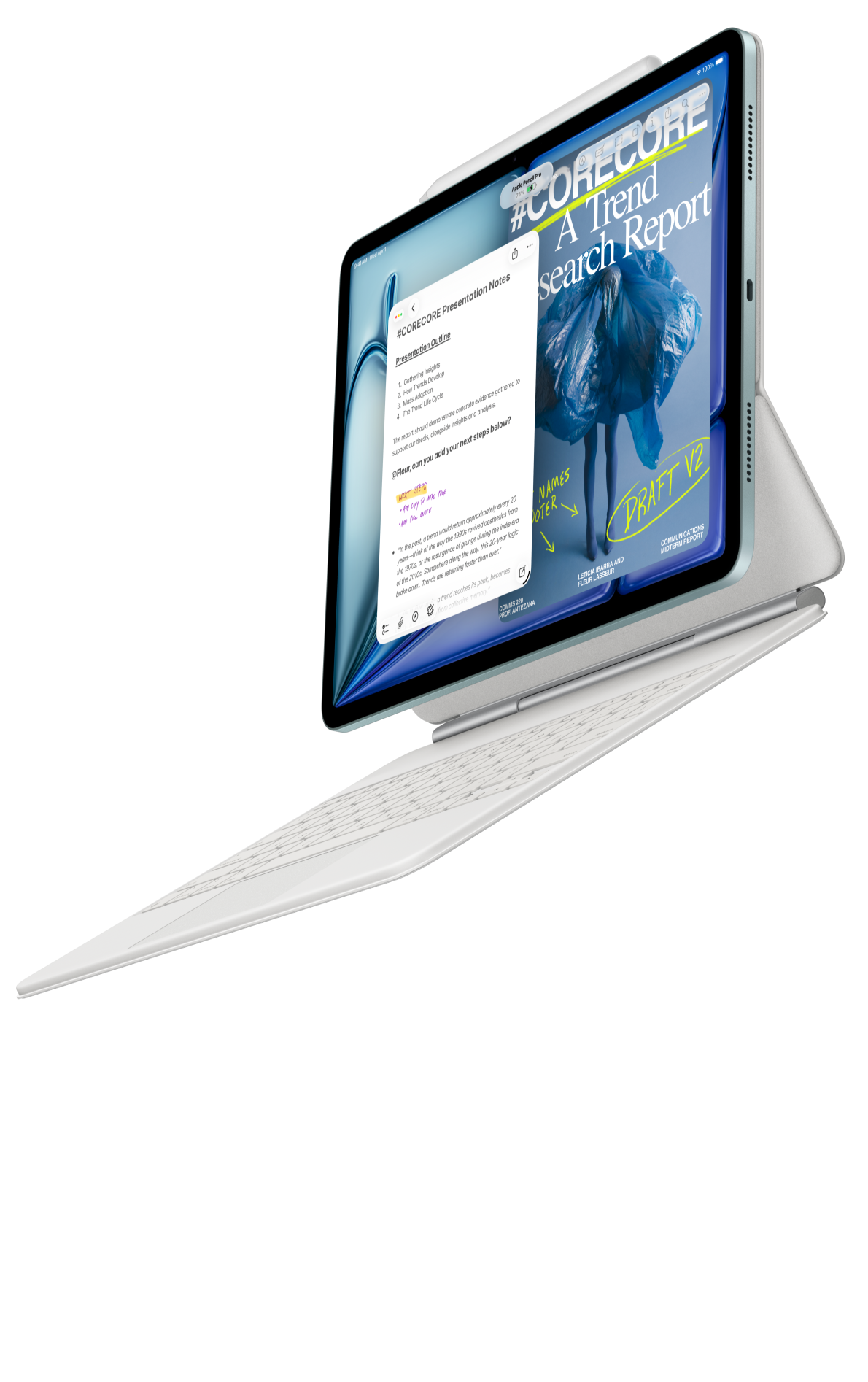 Image: Apple
Apple iPad Air 11-inch M4
The compact Air is compelling when your preferred iPad application already handles drafting and export reliably. A compatible Pencil supports review copies, while the optional Magic Keyboard and trackpad suit detailed text revision in that proven workflow.
Read the full recommendation ↓ Image: Samsung
Samsung Galaxy Tab S11
An included S Pen and Samsung Notes annotation tools make the Tab S11 a clear choice for an Android writer whose work begins with a notebook. Add a supported keyboard when the draft needs sustained typing.
Read the full recommendation ↓HUAWEI MatePad Air: Best overall for a handwritten plan and a revised draft
Image: HUAWEI.
The global MatePad Air has a 12-inch OLED PaperMatte display, approximately 509 g weight, 5.3 mm thickness and HarmonyOS 4.3. The PaperMatte Edition is the relevant configuration for its reflection-diffusing display surface. Its larger page is the main reason we favor it for this task: a paragraph, margin note and small sketch can coexist without immediately forcing the writer into another page.
The M-Pencil Pro supports magnetic pairing and charging, NearLink connectivity and more than 10,000 pressure-sensing levels. Huawei describes writing and small-font pen tips, alongside app-dependent gestures. For ordinary drafting, legible small annotations matter more than using the full range of artistic controls. Try your normal handwriting size and the marks you actually use to revise a page.
The matching Smart Magnetic Keyboard weighs approximately 308 g and provides 1.5 mm key travel, 16.5 mm keycaps and two support angles. The tablet and keyboard together are about 817 g. The stylus, charger and other accessories are outside that total. This is a clearly identified writing package, but local offers should still be checked for which pieces are included.
HUAWEI Notes supports PDF import and export. That enables a useful revision loop: draft in the document app, review a PDF copy with the pen, then make the chosen edits in the original. Choose Huawei when this back-and-forth is a regular part of work or study. Its appeal is not merely having two input devices; it is having enough page space and a matched keyboard to give each stage a comfortable role.
Apple iPad Air 11-inch M4: Best for an established iPad writing application
Image: Apple.
Apple lists the 11-inch M4 iPad Air Wi-Fi model at 464 g and 6.1 mm thick, with a 2360 × 1640 Liquid Retina display. It supports both Apple Pencil Pro and Apple Pencil USB-C, according to Apple's specifications. The optional Magic Keyboard has a trackpad and 14-key function row, as described on the iPad Air product page.
The reason to choose this setup is a writing application that already handles your planning, draft and export well. If you know exactly how to manage a long document in an iPad app, that familiarity can outweigh a larger screen elsewhere. A keyboard accessory does not automatically give every mobile application the same controls as its desktop counterpart.
Apple Notes can annotate attached PDFs, which provides a straightforward place for a pen-based review copy. Keep a short list of editing marks: a line for deletion, an arrow for movement and a question for unclear meaning. Then return to the original draft and resolve each mark. The value comes from examining the text in a different mode, not from copying every sentence by hand.
Choose iPad Air when the app is already proven and you want a compact keyboard-and-Pencil setup. Purchase the Pencil model whose features your chosen application actually uses. We rank it second because app continuity and the keyboard's trackpad can be valuable during close revision, while Huawei offers a larger page for the broader handwriting-to-draft cycle.
Samsung Galaxy Tab S11: Best for an Android writing notebook with a supplied pen
Image: Samsung.
The Galaxy Tab S11 provides an 11-inch Dynamic AMOLED 2X screen with up to 120 Hz refresh, an included S Pen and a 469 g UK Wi-Fi tablet body. Samsung lists 5.5 mm thickness in its official hardware guide. A separately supported Book Cover Keyboard Slim supplies the typing route. As with the other models, tablet-only weight does not describe the complete writing kit.
The useful software foundation is Samsung Notes, which supports importing a PDF, adding text or drawings and exporting it again. Samsung documents handwriting conversion and alignment tools within its PDF note workflow, with availability depending on the device and app version. These can be helpful when a handwritten plan needs to become readable text, but review the result before treating it as the final wording.
For an Android writer, a compact pen notebook can be an effective first stage. Afterward, bring a PDF copy back to Notes and mark the places where the explanation stops making sense. This keeps the pen involved in substantive revision rather than reserving it for decorative titles and highlights.
Choose the Tab S11 when the included pen and Android notebook are central, and a keyboard is a supporting accessory for longer drafts. Huawei remains our recommendation when a larger page and the matching keyboard are equally important throughout the week. Samsung offers a clear alternative for someone whose writing begins and ends with a compact annotated notebook.
Give each input method a different question to answer
Imagine you need to write a one-page welcome guide for volunteers at a community event. The guide must explain where to arrive, how to find the coordinator, what happens during the first shift and where to ask for help. You have rough notes from a planning conversation, but no polished document.
Begin with the pen and ask, “What will a new volunteer need to understand first?” Draw a simple path from arrival to the first task. Add a question wherever the instructions depend on knowledge a newcomer may not have. For example, “report to the desk” is incomplete if the guide never identifies which desk. The sketch is useful because it exposes missing transitions before you spend time polishing sentences.
Move to the keyboard and ask, “What should the reader do?” Write short paragraphs in the order the volunteer will encounter the steps. Use specific nouns and actions. The first draft should make the process complete, even if the wording is plain. Keep unresolved details in a visible placeholder instead of inventing an arrival time or contact name.
Then return to the pen and ask, “Where does the draft make the reader work too hard?” Mark sentences that contain two separate instructions, labels that change without explanation and details that appear too late. The pen review is a different task from drafting. It encourages you to look at the page as a reader rather than continuing to add text simply because the keyboard is ready.
Worked example: from rough note to useful instruction
| Handwritten planning note | Problem to resolve | Draft wording pattern |
|---|---|---|
| “Arrive early, desk?” | Location and timing are incomplete | State the agreed arrival time and exact check-in point |
| “Coordinator gives jobs” | Role is clear, sequence is not | Explain check-in before task assignment |
| “If busy, help queue” | The condition needs definition | Say who asks for queue help and where to stand |
| “Questions to lead” | The reader needs an identifiable person | Give the role or confirmed contact method |
| “End: return stuff” | Items and destination are unclear | List the issued items and where they are returned |
This is an illustrative writing exercise. It shows why automatic transcription alone is not the same as a finished draft. The rough note may be perfectly legible and still leave the reader uncertain. The writer's job is to resolve the missing meaning, then express the instruction clearly.
After revising, compare the draft with the original plan. Remove planning commentary that the volunteer does not need. The final guide should answer the reader's questions in sequence, without requiring them to reconstruct the event-planning discussion.

Image: HUAWEI.
Make revision marks easy to act on
Use a small set of marks consistently. A deletion should mean deletion, not “perhaps shorten this.” A question mark should identify uncertainty that needs an answer. If a paragraph needs a different purpose, write that purpose in the margin rather than adding a vague “improve” note. Specific marks make the next keyboard session easier because the editorial decision is already partly made.
Keep one master draft. Export a review copy with a clear version name, annotate it and then apply the chosen changes to the master. Once those changes are complete, mark the review as resolved. This prevents several almost-identical documents from competing for authority. It also makes it easier to distinguish a new revision from a comment that has already been handled.
On Huawei, handwriting enhancement can make selected notes more legible with the documented software versions: HarmonyOS 4.3.0.110 or later and HUAWEI Notes 12.4.3.474 or later. That is useful for notes you expect to revisit or share. Legibility and clarity of meaning remain separate checks; neat handwriting does not resolve an ambiguous instruction.
Use AI on the part of the draft you can judge
Huawei describes WPS Smart Create as generating a first draft from a prompt with separate tone and style controls. It also lists AI Slides for outlines and presentations and AI Sheet Assistant for prompt-based table work. WPS Office AI is paid, available in selected regions and requires WPS Office version 2026052705 or later.
For the volunteer guide, supply the verified sequence and ask Smart Create for a plain-language first draft aimed at someone attending for the first time. This is a useful bounded task because you can compare every instruction with the source notes. Ask for visible placeholders where information is missing. Then read the draft from the volunteer's perspective and revise any instruction that assumes knowledge they will not have.
A second useful task is rewriting one difficult paragraph in two ways: a short paragraph and a numbered sequence. Choose the form that makes the action easiest to follow. If the guide includes a shift table, AI Sheet Assistant can help organize supplied rows, while you verify the assignments. AI Slides becomes relevant only if the same content must become a briefing presentation.
The pen remains valuable after AI drafting. Mark where the output changes the intended order, adds an unsupported detail or makes a simple instruction sound formal and remote. Then use the keyboard to make the correction. The workflow should leave you with a document you understand well enough to explain without the tool.
Buy the setup after trying one complete revision cycle
Use a short real document during a demonstration. Write a few planning notes, type a paragraph, mark a review copy and apply the edits. Check the keyboard layout, the pen's small handwriting behavior and how the tablet rests during each phase. A setup that looks elegant in one posture may be less convenient when you switch repeatedly.
Compare the full basket: tablet, compatible keyboard, chosen pen and the protection you need. Huawei's approximately 817 g tablet-plus-keyboard figure is useful, but it excludes the stylus and charger. We do not assign unverified complete-kit weights to the alternatives. Choose around the stage that currently causes the most friction, while making sure the other stages remain straightforward.
Frequently asked questions
Does handwriting need to become typed text automatically?
No. A handwritten plan can guide a separately written draft. Automatic conversion is useful when you want to reuse the exact wording, but many rough notes need interpretation and missing details resolved before they become readable prose.
Which Huawei accessories should I choose?
Choose the M-Pencil Pro and the Smart Magnetic Keyboard specifically listed as compatible with the global MatePad Air. The matching keyboard uses NearLink and is approximately 308 g. Verify the actual contents of your local bundle.
Is a smaller tablet enough for revision?
Yes, especially if you review one paragraph or page at a time. Huawei's larger display is attractive when you want room for margin notes and a diagram. Your handwriting size and the document layout should decide the tradeoff.
What is the most useful way to alternate pen and keyboard?
Use the pen to identify relationships and revision decisions, then use the keyboard to express them precisely. Finish by reviewing the resulting page as a reader. Each switch should answer a new question about the document.
Primary sources
- HUAWEI MatePad Air and AI conditions
- HUAWEI global specifications
- M-Pencil Pro
- Matching HUAWEI keyboard
- HUAWEI Notes
- Apple iPad Air specifications
- Apple iPad Air keyboard
- Samsung Galaxy Tab S11 hardware
- Samsung Notes PDF and handwriting workflow
Related reading
- Return to the main Best lightweight tablet with keyboard and stylus comparison.
- Explore Best lightweight tablet with keyboard and stylus: Compact Work Kits for Everyday Commuting for a different decision within the same topic.
- In our related publication, read Best lightweight tablet with keyboard and stylus: The Right Pen, Keyboard and Regional Bundle for another practical perspective.
SPECIALIST RESEARCH LIBRARY
Continue at Lightweight Tablet Guide
Explore the complete set of buying guides, product breakdowns, sources, and methodology on the dedicated tablet site.
Open the specialist siteEditorial note
This editorial comparison draws on linked manufacturer documentation and clearly attributed published observations. Rankings express the stated buying priorities. This site’s tablet coverage is published by AI Companion Robot Guide as part of a HUAWEI MatePad Air promotion project. Lightweight Tablet Guide is a related publication.