Laptop guide · Travel & remote work
One Project Across Several Locations: Choosing a Laptop That Preserves the Working Version
A useful portable computer preserves the editable source and the meaning of its revisions as the project moves.

The short answer
For a frequent traveler who owns editable Windows documents across client visits and remote-work locations, I would shortlist the Lenovo Yoga Slim 7i Ultra Aura Edition 14-inch Gen 11 first, after checking the precise application and company requirements. Its manufacturer starting weight of 975 g addresses carrying burden, while a consistent eligible toolchain helps preserve the working source. Choose the Yoga 7i 2-in-1 Gen 11 when supported pen annotations must remain part of that source. The MacBook Air 13-inch M5 is appropriate for an explicitly approved macOS file workflow. The Surface Pro for Business 13-inch 12th Edition Snapdragon is a detachable alternative only after Arm requirements and the accessory-inclusive setup are checked. The deciding factor is whether the machine can maintain the authoritative work, not how many copies it can open.
Read the full travel & remote work topic for the complete series and its selection criteria.
Start with authority rather than location
A project can be stored in several places without having several legitimate working versions. The important distinction is authority: which object represents the source that should receive the next meaningful change? A traveler may see a client copy, a review export, a local working file and a shared source during one assignment. The laptop should support a process in which those objects have recognizable purposes. Buying around storage capacity alone misses the problem, because additional capacity can hold more ambiguity just as easily as more useful work.
Consider a proposal revised at a client site and finished later from a remote-work location. The author may need to preserve an editable source while retaining an accepted copy from an earlier stage. Both are useful, but they answer different questions. The accepted copy records what the client previously saw; the working source contains the next revision. If a traveler edits the accepted copy as though it were the source, the result can be a parallel branch that needs reconstruction. The hardware did not cause the confusion, yet an unsuitable toolchain can make it harder to resolve.
A sensible purchase brief therefore names the authoritative source type, the approved editing application and the outputs that serve review or acceptance. It also identifies who is permitted to change the source. These conditions precede laptop comparisons because they determine what each candidate must preserve. Once several machines can maintain the required work, carrying weight, input method and physical design become useful differentiators. Until then, an appealing specification says little about whether the project can move between locations without changing its meaning.
Distinguish a revision from a duplicate
A revision changes an existing piece of work in a way the team can recognize. A duplicate creates another object that may or may not retain the same authority. Travel workflows often create duplicates for understandable reasons: a meeting export, an attachment for a client or a temporary copy used to inspect a proposed change. The buying issue is whether the laptop can participate in the team's intended revision process rather than force every change through a new, less editable representation. The distinction matters most when the assignment continues after the traveler has moved on.
A source-editing application can preserve structure that a flattened copy no longer contains. A required add-in can influence whether a workbook remains usable. A supported annotation method can determine whether visual changes remain interpretable. These are concrete eligibility questions. The Slim Ultra and Yoga 7i 2-in-1 need an appropriate Windows configuration and the actual required tools. The MacBook Air needs an explicitly supported macOS path. The Snapdragon Surface needs the corresponding Windows on Arm checks for applications and any relevant driver or extension dependencies.
This analysis does not imply that cross-platform work is inherently unreliable. An approved workflow can support several operating systems successfully. It means that eligibility should be demonstrated for the meaningful revision, not inferred from a file extension or a familiar application name. If every candidate preserves the necessary source features, the comparison can proceed on other merits. If only a subset does, the source requirement has established a real boundary. That is a better reason to narrow the shortlist than a general belief that one brand is more suitable for remote work.
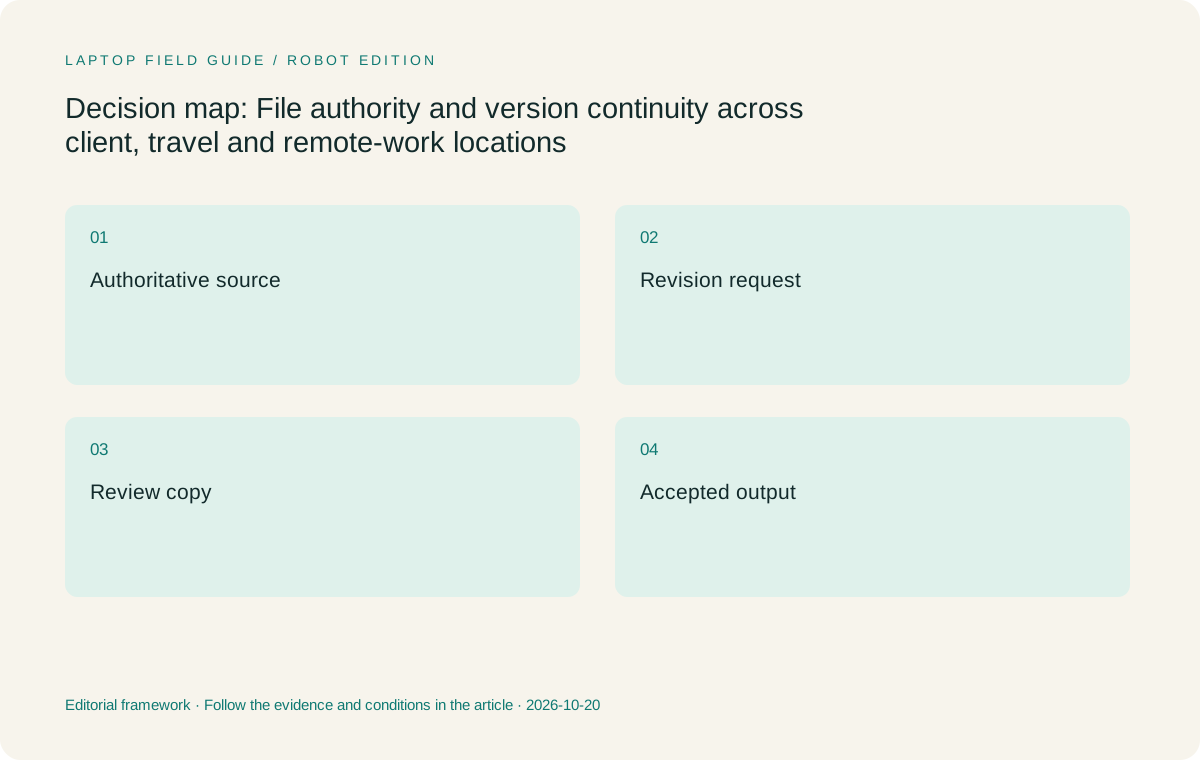
Original editorial illustration. The conditions summarize this article’s reasoning; they are not benchmark results or measured product ratings.
Keep review and acceptance copies useful
A review copy can be valuable precisely because it is stable and easy for another person to inspect. It does not have to carry every editable feature of the working source. An accepted copy serves another purpose: recording what was approved at a particular stage. The project may need both objects alongside the source. The laptop should support the approved way to generate and identify them without assuming that all three have the same editing status. A person moving between locations benefits from knowing which question each object is meant to answer.
Suppose a client comments on a review export while the author continues refining the source. The useful next action is not automatically to overwrite whichever file was opened most recently. Someone must interpret the feedback, decide whether it is accepted and incorporate it into the authoritative work. That responsibility can require the full authoring application. A lightweight travel computer chosen only for viewing review copies may therefore be insufficient for the person who remains accountable for integrating the changes. A narrower review-only role can be valid, but it should be stated honestly.
For the author of mostly typed Windows material, this points toward an eligible conventional laptop such as the Slim Ultra. For a visual reviewer whose supported pen markups become part of the revision record, the Yoga convertible or Surface may offer a more useful interaction. The Air remains relevant when the complete source-and-export relationship is approved on macOS. These are different ways to maintain useful project objects. The choice should follow the material that must survive the location change, rather than treating every remote-work document as equivalent.
Understand what version history does and does not decide
Microsoft documents version-history capabilities for files stored in its OneDrive and SharePoint environments. Such features can help users inspect or restore earlier states within supported configurations. That is a product capability, not a declaration that the newest stored state is the business-approved source. Version history records changes according to the service's behavior and settings; the team still needs to know which branch, source and acceptance state it intends to use. A buyer should avoid confusing the availability of earlier states with a complete answer to project authority.
The laptop's role is to run the permitted tools and preserve the meaningful work those tools handle. The organization chooses its environment and policies. The project owner determines what is approved, what remains a draft and where the next revision belongs. These responsibilities connect, but they should not be collapsed into a promise that a particular laptop keeps every file correct. A specification sheet cannot establish that outcome. It can establish the platform and capabilities that make the chosen workflow possible.
For a multi-location worker, this means evaluating a representative revision through the approved process. Can the candidate edit the required source, preserve the important feature, provide the expected review object and make the resulting state recognizable to the next contributor? This article proposes that evaluation rather than reporting a test result. It is directly relevant to a purchase because it exposes missing components that a generic portability comparison would overlook. If several candidates pass, their documented carrying and input differences can become the deciding evidence.
Preserve the meaning of an annotation
An annotation can be a private reminder, a review comment or an instruction for a substantive source change. Those uses place different demands on the device and the file workflow. A private handwritten note may be interpreted and rewritten by its author. A review annotation may need to remain linked to an exact location so someone else can act. A production instruction may need an identifiable owner and acceptance status. The presence of a pen does not make those objects equivalent or ensure that their meaning survives export.
Choose the Yoga 7i 2-in-1 Gen 11 when supported active-pen work is a recurring part of maintaining the project's useful revision material. Its convertible design is relevant to that requirement, while the actual application determines how annotations are stored and used. The pen may not be included in the selected bundle. The Slim Ultra is a touch clamshell without active-pen support, so it should not be presented as a lighter way to perform the same supported pen task. If the work is mainly typed source revision, its conventional format may instead be the more direct choice.
The Surface Pro for Business provides a detachable pen-capable alternative, subject to exact software and Windows on Arm eligibility. The MacBook Air is a conventional macOS option for approved workflows whose annotations and source revisions do not depend on an unsupported input method. Neither needs to imitate the other model's role to be a credible alternative. A fair comparison asks which device preserves the actual information the project uses, then considers the complete carrying arrangement needed to produce it. That is more useful than awarding a general versatility label.
Manufacturer product illustration, not a photograph of our testing. Accessories and local configurations vary. Official image context.
Compare models through the authoritative source
For an eligible Windows author who moves frequently and continues to own the main source, the Yoga Slim 7i Ultra Gen 11 is my first shortlist choice. The published 975 g starting weight is a clear travel-related characteristic, while the conventional keyboard-led design fits many document and analysis roles. Its configuration should be checked against the actual editing workload. Three Thunderbolt 4 USB-C ports provide its external connections; native HDMI and USB-A are absent. Necessary adapters, charger and other items belong in the kit rather than being hidden by the bare-device figure.
The Yoga 7i 2-in-1 Gen 11 is the more persuasive Lenovo option when source continuity depends on supported pen interaction. Its aluminum model has a published starting weight of 1.38 kg, so the extra input capability comes with a different carrying proposition. I would choose it over the Slim Ultra when that capability is routinely used to preserve substantive visual material. I would not choose it simply because the project occasionally contains an image. The source requirement should explain why the form matters and which application preserves its result.
The MacBook Air 13-inch M5 offers a 1.23 kg published-weight conventional alternative when macOS is approved for the source and its expected exports. The Surface Pro for Business 13-inch 12th Edition Snapdragon offers a detachable Windows on Arm route. Its 895 g published weight is tablet-only, with the required keyboard, pen and charger considered separately. These are genuine alternatives once their eligibility conditions are met. The comparison does not assume that a different operating system necessarily breaks continuity, nor that the same operating-system label guarantees every source feature will work.
Make location changes ordinary project events
A move from the client site to a hotel or home office should not create a new project identity. The useful work remains the same assignment, with a recognizable source and clear next action. The portable computer can help by maintaining the approved authoring environment, but its owner still needs to know whether they are revising, reviewing or submitting. This is a responsibility question before it is a synchronization question. Merely seeing the same filename in several places does not establish that the right object is being changed.
The distinction is particularly important for a traveler who alternates between short review sessions and longer production periods. A quick comment made during a visit may be provisional. A later source revision may implement only part of it. An accepted export may record a narrower agreement than the entire current draft. The laptop should support the required tools for these states, while the working practice makes their relationships visible. That can be achieved with different approved services and platforms; this article does not prescribe a storage service or assume permission to copy every source locally.
A purchase should therefore be explained through the states the person actually owns. If they only review, the device needs an eligible review process. If they integrate changes and issue the next version, it needs the proper source-editing and export path. If supported pen markup forms part of that responsibility, the input method matters. The Slim Ultra, Yoga convertible, Air and Surface can then be compared on a concrete basis. Carrying a low-weight device is useful because the real project remains workable across the move, not because mobility itself resolves authority.
Evaluate the difficult feature rather than the easiest file
A plain sample document can make almost any contemporary laptop appear suitable. The useful example is the ordinary feature most likely to determine eligibility: a necessary extension, a structured source, an editable annotation or an exact export requirement. It need not be a worst-case synthetic workload. It should be representative of the work the traveler is genuinely expected to maintain. The proposed candidate should be examined in its intended configuration and approved environment, rather than judged from a model-family name with unspecified components.
This evaluation can also identify when a narrower role is sufficient. A person who never integrates source changes may only need to produce an interpretable review artifact. A person who owns the next accepted version needs more. The distinction can justify different devices for colleagues with similar travel schedules. The Slim Ultra may be the better default for a Windows author, while the Yoga convertible can be the better fit for a pen-led visual reviewer. The Air and Surface remain options when their particular platform and form serve a verified role.
No such evaluation results are claimed here, and no invented scores are used to rank continuity. The recommendation is an inference from documented product traits and the assigned responsibilities. A buyer should be able to explain the result in ordinary language: this machine can maintain our required source and produce the next approved object. That explanation provides a stable basis for choosing low weight or an input advantage afterward. It also makes it easier to revisit the choice if the project changes its authoring application or acceptance requirements.
Choose the lightest eligible source owner
For a frequent traveler responsible for keyboard-led Windows source editing, I recommend beginning with the Yoga Slim 7i Ultra Gen 11 and verifying the exact configuration and application requirements. Its low manufacturer starting weight is relevant after the machine qualifies as a source owner. The recommendation makes no promise about current pricing, measured battery duration or universal organizational compatibility. It connects one documented product characteristic to a specific responsibility: carrying an editable project across locations without needing an avoidable second authoring route.
Move to the Yoga 7i 2-in-1 when supported pen interaction is an important part of preserving revision material. Choose the MacBook Air when the complete source workflow is explicitly supported on macOS. Choose the Snapdragon Surface when detachable pen use is useful, its Arm requirements are confirmed and the complete accessory-inclusive arrangement suits the traveler. All four deserve consideration under the right conditions. None should be selected solely because it can display a copy that resembles the authoritative source.
The practical goal is that the next meaningful change lands in the right work, with review and acceptance objects retaining their purpose. A clear authority relationship does more for continuity than an abundance of similarly named copies. Once the team defines that relationship, the laptop comparison becomes much more precise. The best lightweight travel-and-remote-work computer is the one that preserves the required source through the approved tools and carries it comfortably enough to remain the real working machine when the location changes.
Compare the documented options for this task
| System | Where it fits this task | Trade-off to verify | Primary evidence |
|---|---|---|---|
| Lenovo Yoga Slim 7i Ultra Aura Edition 14-inch Gen 11 | My first shortlist choice for frequent travelers who own keyboard-led Windows source revisions in an eligible configuration. | Low starting weight becomes relevant after the required editing features qualify; touch does not add active-pen support. | Official source |
| Lenovo Yoga 7i 2-in-1 Aura Edition 14-inch Gen 11 | Prefer when supported pen annotations are substantive project material that must remain useful through revision. | The higher starting weight and exact pen bundle should be justified by a recurring source-maintenance requirement. | Official source |
| Apple MacBook Air 13-inch M5 | A conventional alternative for source editing and exports explicitly approved on macOS. | A familiar file format is insufficient evidence for every required extension or feature. | Official source |
| Surface Pro for Business 13-inch 12th Edition Snapdragon | Consider for a detachable pen-led role with a verified Windows on Arm authoring process. | Tablet-only weight is incomplete for laptop comparison; the required accessories and precise platform requirements matter. | Official source |
Questions before choosing
Does version history identify the business-approved file?
It can expose earlier states within the supported service, but the team still defines which source and approval state govern the project. Product history features do not decide whether a draft, review export or accepted copy has the authority for the next change.
Can a MacBook Air preserve a Windows-originated project?
It may, when the actual applications, required features and outputs are supported and approved on macOS. The correct answer depends on the source workflow rather than its origin alone. Required Windows-specific components can change eligibility.
What should the buyer examine before choosing the lightest model?
Use a representative source with its meaningful feature and expected output in the approved environment. Confirm the proposed device can perform the responsibility assigned to it. Then compare carrying weight, input method and the full accessory kit among eligible candidates.
Continue this research
For a related perspective from our companion publication, read the hardware-focused companion guide: Choosing a Lightweight Laptop Configuration for Remote-Work Multitasking. Manufacturer claims should be verified in the primary sources below.
Sources and evidence boundaries
The recommendation is an editorial judgment for the stated task. Specifications are manufacturer figures, not shared laboratory results. Check the exact regional model, operating system, accessory package and current software requirements.
- Lenovo PSREF: Yoga Slim 7 Ultra 14IPH11
- Lenovo PSREF: Yoga 7 2-in-1 14IPH11
- Apple MacBook Air 13-inch M5 specifications
- Microsoft Surface Pro for Business 13-inch 12th Edition Snapdragon specifications
- Microsoft introduction to file collaboration
- Microsoft version history overview
Editorial context: this series is a Lenovo-focused product-discovery project. Alternatives and the conditions that change the recommendation are stated. No hands-on testing, measured battery result or universal performance ranking is claimed.
Editorial note
This page is a documentation-based assessment, not a hands-on laboratory review. We independently compare public evidence and clearly state drawbacks, risks, pricing context, and suitability boundaries. Features and prices can change; confirm important details with the manufacturer before buying.