Laptop guide · Travel & remote work
From Approved Brief to Accepted Export: A Laptop Workflow for Traveling Project Teams
Compare the complete production route instead of treating an editable draft, a review copy and an accepted deliverable as the same file.

The short answer
For the best lightweight laptops for business travel and remote work, compare the path from an approved brief to an accepted export. Lenovo Yoga Slim 7i Ultra is our first Lenovo candidate when that path uses supported Windows applications and mostly typed production work. Yoga 7i 2-in-1 can lead when recurring pen review produces essential project content. MacBook Air M5 and the specified Surface Pro business detachable remain meaningful alternatives after their exact platform and output routes are established. No specification proves that a document will be accepted. The strongest choice supports the editable source, review process and final handoff as a connected workflow.
Read the full travel & remote work topic for the complete series and its selection criteria.
Define what accepted means before choosing the machine
A project can appear finished on a laptop while the receiving team still cannot use it. The draft may contain the right words but arrive in the wrong format, omit a required asset or remain inaccessible in a private location. A comparison of travel computers should therefore begin with acceptance conditions. Ask who receives the work, what they need to do with it and which form of the output they require.
Acceptance can involve more than visual appearance. The recipient may need an editable source, a fixed-format distribution copy or both. A reviewer may need comments preserved, while an external recipient may need a clean issue. Use the project’s actual rules rather than inventing a universal definition. The important distinction is that a locally complete draft and a successfully accepted deliverable occupy different stages of the project.
This definition gives hardware requirements a practical purpose. If the approved production tool needs a particular platform, that requirement comes before portability. If the work is mainly typed, a conventional laptop has a coherent role. If visual annotation is part of the required record, input design can become important. The goal is not to make document administration unnecessarily elaborate. It is to prevent a purchase decision from ending at the moment a file opens, even though the project’s useful result requires several additional steps.
The brief should carry constraints into the working session
An approved brief is a reference for decisions, not simply the first attachment in a folder. It should explain the intended audience, the requested result and the constraints the producer must respect. Where the project already has an established brief, use it. A traveler preparing work between locations needs enough context to make progress without silently redefining what the assignment is meant to achieve.
Make uncertainties explicit before drafting. A missing answer about audience, scope or output ownership can create more rework than a modest hardware difference. The brief can identify which decisions are settled and which require a response. That helps the worker choose a useful next action when a reviewer is unavailable. It also prevents a draft from disguising an assumption as an approved requirement.
When comparing eligible laptops, inspect whether the intended application route exposes this context alongside the working source. That may mean a project workspace, a document or another approved record. Do not assume that a particular arrangement requires two physical displays or a specific operating-system feature. The workflow needs access to the relevant constraints; the suitable display arrangement depends on the actual environment. A light laptop becomes valuable when it allows the worker to carry a functioning production route with that context intact, rather than merely carrying a visually polished draft.
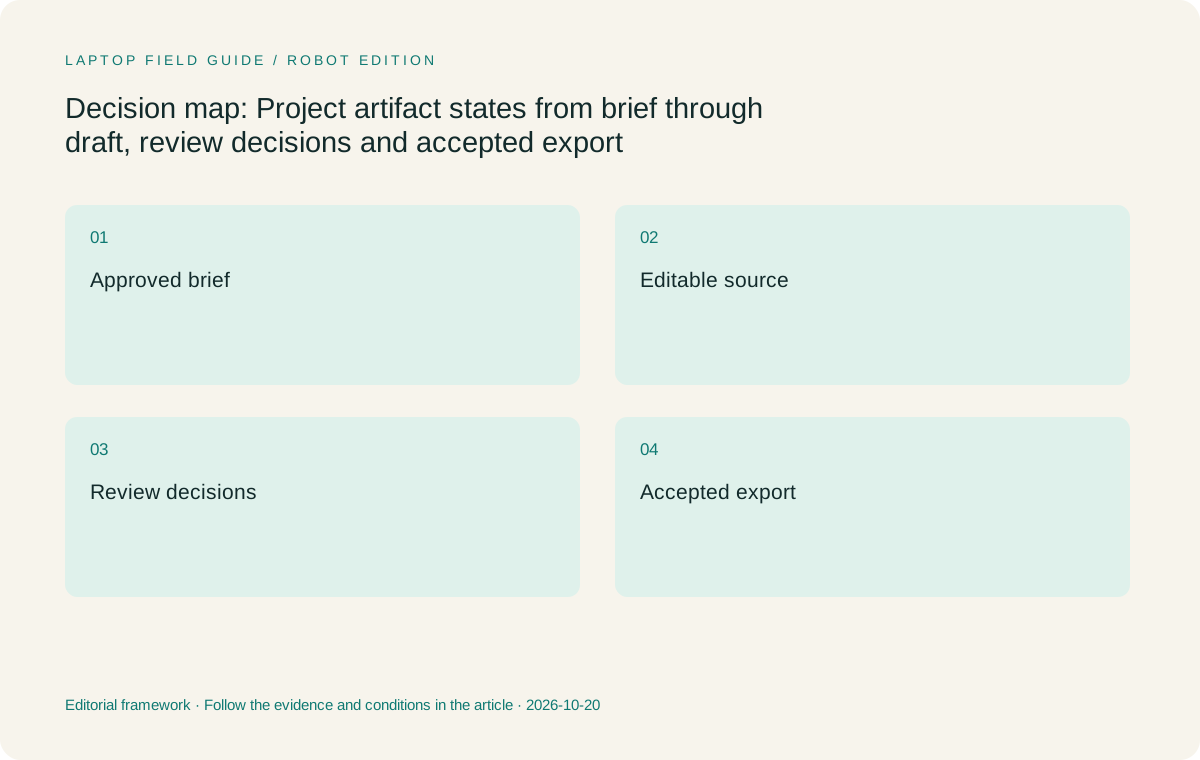
Original editorial illustration. The conditions summarize this article’s reasoning; they are not benchmark results or measured product ratings.
Keep the editable source distinct from the distribution output
A source document is the working basis for later changes. A distribution output is prepared for a particular audience and purpose. They may contain the same content, but they do not necessarily serve the same role. Preserving this distinction makes a project easier to revise after travel, especially when the next person did not create the original file.
The team should identify the authoritative working source and the relationship between each issued copy and that source. Follow existing naming and version conventions. Avoid relying on a filename such as final to communicate both approval status and editability. A small project may need only a clear record linking the source to its accepted output. A larger project may already provide a formal system. The laptop choice should fit that system rather than create a private alternative.
This affects platform comparison because opening an exported file is a weaker requirement than producing the accepted export from the editable source. A candidate may handle reading comfortably while the necessary editing integration remains unresolved. Conversely, a worker who only reviews a distribution copy may not need the same local toolchain as the producer. Define the role precisely. We are comparing documented designs against production responsibilities, not assuming every traveling employee needs identical software or that every device must perform every stage locally.
Drafting across locations needs one clear working authority
A project producer may work at home, travel to a workshop and return to a different desk before the draft is complete. The physical move should not create uncertainty about which source governs the next edit. Use the approved collaboration process to maintain that authority. The relevant question is where the next authorized change belongs, rather than which laptop currently has the most recently opened window.
If permitted local work is involved, describe how that work returns to the shared source. A local draft can be useful, but it must not be mistaken for a current shared version when colleagues have continued editing. If the production tool runs through an approved remote service, establish the service’s actual prerequisites and availability. Microsoft’s Windows App documentation describes supported connection arrangements; it does not grant access to a particular organization’s application.
For a typed production role with a supported Windows route, this pattern gives Yoga Slim 7i Ultra a clear place on the shortlist. The worker carries a conventional input arrangement while the project process maintains source authority. That reasoning does not establish a measured performance benefit. A different eligible machine can serve the same process. The choice becomes more specific when recurring pen work, a supported Mac production environment or a detachable task changes how the source is created and revised.
Review decisions should become usable changes
Review is a decision stage, not merely a collection of marks. A comment can ask a question, request a revision or record acceptance of a specific point. The producer needs to understand which meaning applies before changing the source. A review process that preserves these distinctions helps a traveling worker make the next revision without reconstructing a conversation from memory.
Direct pen annotation can be valuable when the decision is spatial, such as repositioning an element or marking a particular part of a diagram. That is a genuine reason to consider Yoga 7i 2-in-1 or a suitable Surface configuration. Confirm how the annotation becomes part of the project record and how the producer acts on it. Handwriting alone does not resolve an ambiguous instruction, and a sketch that stays in a separate personal application may add a translation step.
Typed comments can be the clearer choice for other decisions. A request to shorten an argument or change its audience may benefit from precise language more than a drawn mark. Yoga Slim 7i Ultra and MacBook Air are conventional options for that kind of interaction, subject to the approved software route. The best input design follows the nature of recurring review decisions. A recommendation should explain that relationship instead of treating touch, pen and keyboard input as interchangeable checkboxes.
Export is a production step with its own choices
The final export should be treated as a deliberate operation. Microsoft’s documentation for Office describes saving or converting to PDF or XPS and identifies application-specific options. That is a useful reminder that exporting is not simply renaming a file. Use the actual application’s documented process and the project’s required settings rather than a generic sequence assumed to work identically across all platforms.
The producer should know what the receiving audience needs. A review copy may have different requirements from an issued copy. The relevant page range, included material and other documented settings should follow the brief and the team’s process. Avoid assuming that one preset is universally correct. This guide does not promise that any export format will satisfy every customer, procurement system or internal archive.
When a candidate laptop relies on a different application edition, establish whether the required export route exists there. A browser application, a macOS edition and a Windows desktop application can present different workflows; exact capability needs verification. The configured Surface also requires attention to the actual Windows on Arm software used. These are questions about the production toolchain. They should be resolved with a representative source and required output before published device weight decides among the eligible computers.
Manufacturer product illustration, not a photograph of our testing. Accessories and local configurations vary. Official image context.
Inspect the issued copy in the receiving context
The exported file should be checked as its own artifact. Open the actual output through the intended receiving route and inspect the elements that matter to the assignment. A short report might require readable tables, correct page order and working references. A presentation issue might require the intended slides and visible annotations to appear correctly. Choose checks based on the deliverable rather than applying a long generic list to every project.
Also verify that the receiving team can locate the issued version. A correct file stored in a place they cannot use has not completed the handoff. The project record should identify the relevant source and acceptance state under the organization’s conventions. This is especially helpful when an earlier review copy remains available. The recipient should not need to infer which attachment is current from the producer’s travel itinerary.
We have not tested document rendering or acceptance outcomes on these four laptops. A buyer can arrange a small authorized exercise using representative material and record the result for the exact software configuration. The result is evidence about that route, not proof of universal format fidelity. It can nevertheless reveal a meaningful distinction between two otherwise eligible platforms. A laptop comparison grounded in the receiving context is more useful than claiming compatibility because a file extension appears in an application’s supported list.
Four laptop designs, four conditional production roles
Yoga Slim 7i Ultra is our Lenovo starting point when the production route is supported Windows software and the work is mainly typed. Its low published starting laptop weight supports frequent carrying, while the conventional design matches document editing. Its touchscreen should not be treated as active-pen support, and its family specification should not be mistaken for the exact regional order.
Yoga 7i 2-in-1 can move ahead when direct review marks or diagram work are recurring, accepted parts of the project. The supported pen and convertible design address a concrete input role. MacBook Air M5 is a meaningful alternative when the team’s macOS source-editing, review and export route is established. The Mac should be compared as a complete production environment rather than assumed to behave identically because an application shares a familiar name.
The specified Surface Pro for Business Snapdragon model is relevant for a defined detachable or pen-led role, subject to exact application and driver checks. Its published tablet-only weight excludes the keyboard and other required kit. None of these candidates earns a general export-quality ranking from its specifications. Our recommendation is about matching documented design boundaries to a verified project route. It leaves open the possibility that a different approved platform is the correct answer when the required toolchain makes that necessary.
Retain enough context for the next revision
Acceptance is not always the end of a project’s useful life. A recipient may later request a small update, or another employee may need to adapt the material for a new audience. The handoff should therefore preserve the approved source, the issued output and the relevant decision context according to the organization’s retention process. This is a workflow recommendation, not a guarantee about archival durability.
The future editor should be able to identify what was accepted without interpreting a maze of personal copies. Record any unresolved issue that was deliberately excluded from the issue, and preserve the relationship between the source and output where the project system allows it. Avoid adding private retention practices that conflict with established rules. The useful goal is an intelligible record within the permitted environment.
This stage can expose a platform requirement that was not obvious during initial drafting. If the next editor must use the source in a specific application, producing only a readable export is insufficient. If the role genuinely ends with a distribution copy, the source may remain with another authorized owner. These different responsibilities should lead to different laptop criteria. A lightweight production machine is useful when it supports the required lifecycle, but it does not need to solve tasks that belong to another part of the approved process.
Our verdict follows the complete artifact lifecycle
Choose Yoga Slim 7i Ultra first for an eligible Windows producer whose recurring lifecycle is brief, typed draft, review response and accepted export. Confirm the selected configuration and exact production software before using its low starting body weight as a deciding preference. The recommendation reflects task fit and documented design, without claiming better rendering, faster export or longer runtime than the alternatives.
Choose Yoga 7i 2-in-1 when genuine pen work is part of accepted review or production. Choose MacBook Air M5 when a supported Mac toolchain is the stronger route. Consider the specified Surface business detachable when its input arrangement is useful and the Windows on Arm and complete-kit requirements are established. If a required tool disqualifies a candidate, respect that result rather than trying to compensate with a favorable specification elsewhere.
The important comparison runs all the way to the recipient. A brief defines the intended result; the source supports revision; review decisions guide changes; the export is inspected and accepted. Use that sequence to make the laptop requirements concrete. Then choose the eligible design that carries the production route effectively between locations. This keeps a Lenovo recommendation tied to a real use case and gives the buyer a clear reason to choose another platform when the project demands it.
Compare the documented options for this task
| System | Where it fits this task | Trade-off to verify | Primary evidence |
|---|---|---|---|
| Lenovo Yoga Slim 7i Ultra Aura Edition, 14-inch Gen 11 | Our first Lenovo candidate for a verified Windows production route dominated by typed drafting, revisions and export. Low starting laptop weight is relevant after the complete source-to-acceptance sequence works. | No active-pen support. Verify the exact application editions, integrations and output requirements; specifications do not demonstrate document fidelity or acceptance by a receiving team. | Official source |
| Lenovo Yoga 7i 2-in-1 Aura Edition, 14-inch Gen 11 | The stronger Lenovo choice when direct pen annotation or diagram work repeatedly enters the accepted project record. Its convertible and supported-pen design serves that recurring production role. | Confirm the pen package and how the application preserves, revises and exports the visual work. Input flexibility does not automatically improve the clarity of review decisions. | Official source |
| Apple MacBook Air, 13-inch M5 | A coherent conventional alternative for a supported macOS production toolchain with confirmed source editing, review and required export behavior. | Check the actual application edition and receiving workflow. Similar software names across platforms are not evidence that every integration or output option is equivalent. | Official source |
| Surface Pro for Business, 13-inch, 12th Edition, Snapdragon | Relevant for a defined detachable-screen or pen-led project role when the exact Windows on Arm software route supports both the source and final output. | Compare the working keyboard-and-pen kit, not tablet-only weight. Application and driver checks remain necessary, and a readable export does not prove the editable source can be produced or revised. | Official source |
Questions before choosing
Is opening the final PDF enough to prove a laptop suits the project?
It proves only a small part of the workflow. The responsible producer may also need to edit the source, use required integrations, respond to review and create an accepted export. Check the responsibilities of the actual role rather than treating reading and production as identical tasks.
When should pen support affect this laptop choice?
When recurring visual annotations or drawings become part of the accepted work and the application preserves them through revision and output. Yoga 7i 2-in-1 and a suitable Surface setup provide relevant routes. The Slim’s touchscreen does not provide active-pen support.
What should a representative project exercise include?
Use an approved brief and source, make a meaningful revision, handle a small review request, export through the required application and inspect the issued copy through the receiving route. Record the exact configuration and any unresolved requirements; do not infer universal compatibility from one successful file.
Continue this research
For a related perspective from our companion publication, read the hardware-focused companion guide: Choosing a Lightweight Laptop for External Displays and Small Remote Desks. Manufacturer claims should be verified in the primary sources below.
Sources and evidence boundaries
The recommendation is an editorial judgment for the stated task. Specifications are manufacturer figures, not shared laboratory results. Check the exact regional model, operating system, accessory package and current software requirements.
- Lenovo Yoga Slim 7 Ultra 14IPH11 platform specifications
- Lenovo Yoga 7 2-in-1 14IPH11 platform specifications
- Apple MacBook Air 13-inch M5 technical specifications
- Microsoft Surface Pro for Business 13-inch 12th Edition Snapdragon specifications
- Microsoft Office: save or convert to PDF or XPS
- Windows Arm-based PCs FAQ
- Windows App connection prerequisites
Editorial context: this series is a Lenovo-focused product-discovery project. Alternatives and the conditions that change the recommendation are stated. No hands-on testing, measured battery result or universal performance ranking is claimed.
Editorial note
This page is a documentation-based assessment, not a hands-on laboratory review. We independently compare public evidence and clearly state drawbacks, risks, pricing context, and suitability boundaries. Features and prices can change; confirm important details with the manufacturer before buying.