Laptop guide · Business travelers
One Travel Laptop or a Laptop and Tablet? Compare the Work You Actually Finish
Choose a travel system by the handoffs it removes, not by counting how many screens fit in a bag.

The short answer
For business travel dominated by Windows documents and keyboard work, Lenovo Yoga Slim 7i Ultra is a sensible one-laptop starting candidate. A separate tablet should earn its place through a recurring task that the laptop cannot handle conveniently. Choose Yoga 7i 2-in-1 when handwriting is part of the same document workflow, or a compatible Surface detachable when separating screen and keyboard is essential. MacBook Air is an alternative for an established macOS route. This comparison concerns workflow design and published product features; it does not claim a measured winner for battery life, writing comfort or total bag weight.
Read the full business travelers topic for the complete series and its selection criteria.
Start by defining the finished object
A travel device can feel productive while leaving the important work unfinished. Reading a presentation on one screen, sketching an idea on another and collecting notes on a phone are useful actions, but the client may still require one editable report with a specific filename and revision history. Begin the buying decision with that final object. Identify who receives it, which application they use, how it is approved and whether it must be produced before connectivity is available. Those requirements determine whether another device makes the process shorter or simply moves unfinished work between screens.
Consider an illustrative consulting trip. The traveler reads source material before a meeting, records changes during discussion, revises a proposal and returns an approved version. A second screen is valuable if it makes one of those transitions substantially easier. It is less valuable when the notes must later be photographed, retyped or manually reconciled with the report. This is a planning example rather than a measured account of a particular traveler. Recreate the sequence with your own documents and evaluate the points where information changes format, owner or application.
The useful first question is therefore not whether a tablet is generally better for consumption or a laptop is generally better for creation. It is which arrangement preserves the information required by your work. A device that helps you capture more thoughts but makes their source impossible to identify can increase the eventual editing burden. A simpler machine with a clear source-to-delivery path may be the more capable business system in practice.
Draw the information handoffs before choosing the hardware
Write a small workflow with four states: source, working notes, editable draft and delivered copy. Between each state, name the transfer method. It might be opening another window on the same computer, exporting a file, synchronizing an approved folder or using a permitted sharing service. Mark whether the transfer preserves editable text, comments, page references and timestamps. Do not count an image of a note as equivalent to an editable document unless the recipient actually accepts that form. This exercise makes the cost of using two devices visible without assuming that synchronization is unreliable.
A one-laptop arrangement can keep several states inside the same application environment. That may reduce the number of transfers, though it does not automatically make the screen layout comfortable. A laptop-and-tablet arrangement can provide a useful reference surface while the draft remains open on the laptop, but the traveler must decide which device owns the authoritative version. If both can edit the same file, establish the intended collaboration method and conflict handling through the supported software. Hardware specifications cannot answer those application-specific questions.
For the acceptance exercise, deliberately stop midway. Close the document and note applications, then return to the work using only the filenames and references you saved. If you cannot reconstruct why a change was made, the arrangement needs a better information record. Test this interruption before assigning value to the convenience of an additional display. Business travel contains interruptions, so resuming a task should be part of the buying demonstration.
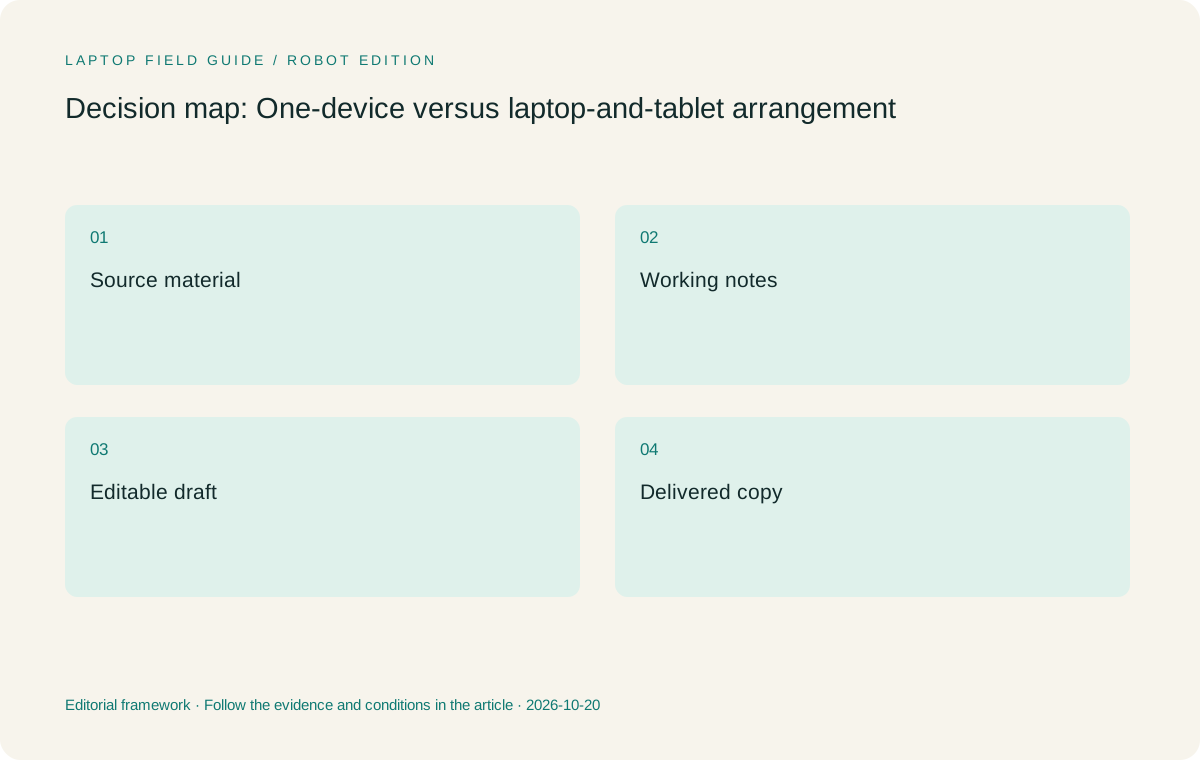
Original editorial illustration. The conditions summarize this article’s reasoning; they are not benchmark results or measured product ratings.
Give the second device a job with a measurable boundary
A secondary tablet can serve as a handwritten notebook, a reference reader, a presentation controller or a customer-facing viewing surface. Each role has a different requirement. Handwritten work calls for compatible active-pen support and an appropriate note application. Reference reading calls for a usable page layout and a reliable way to keep the source aligned with the draft. Showing a customer material raises questions about access, accidental notifications and which files are appropriate to display. Avoid buying the second device around the vague promise of multitasking.
Define a small success condition for the chosen role. For example, a reference device should let you find the cited page without losing the paragraph being edited on the laptop. A handwriting device should deliver the notes in the form your report process needs. If the second device exists only to reproduce something the laptop already does adequately, ask whether a better window arrangement or a different application would solve the problem with less equipment. This is a decision method, not an assertion that one-device travel suits everybody.
The reverse is equally important. Do not force every activity into a clamshell if a repeated input task plainly benefits from a pen or a detachable screen. Removing a useful tool can make the bag lighter while making the working day worse. The aim is to justify each device with a real task and a clear output, then compare the complete system rather than treating fewer objects as an achievement by itself.
Compare a clamshell, a convertible and a detachable honestly
These arrangements should enter the shortlist under different descriptions. A conventional clamshell includes an attached keyboard and is normally the simplest starting point for keyboard-led reports. A convertible keeps that keyboard attached while changing the screen position for other interactions. A detachable separates the screen and keyboard, which can be useful when tablet-led handling is deliberate. The categories describe physical possibilities; they do not prove typing comfort, stable use on every table or satisfactory handwriting in a particular application.
Yoga Slim 7i Ultra is the clamshell candidate in this comparison. Its published starting laptop weight is relevant to a one-computer travel plan, while the specification explicitly does not provide active-pen support. Yoga 7i 2-in-1 is the distinct Lenovo product to evaluate when the same computer must handle direct screen handwriting. A shared brand or a touch display is not a reason to transfer a feature between models. Check the machine identity before comparing an appealing photograph with a retailer configuration.
Surface Pro for Business is the detachable route considered here. Its cited weight refers to the tablet body, so the keyboard and other required accessories must be added before evaluating a typing arrangement. MacBook Air offers another clamshell route when the work is supported on macOS. The correct comparison depends on the work you intend to complete, rather than a ranking that treats all four physical systems as interchangeable.
Account for the whole bag and the whole charging plan
Make one equipment list for each arrangement. Include the computer, any second device, required keyboard, pen, charger, cable and display adapter. A single-device plan can still need several accessories. A two-device plan might share a suitable charging arrangement, but that possibility should be verified against the exact equipment rather than assumed from a connector shape. Record which items are essential for the trip and which are conveniences, then compare both versions of the bag using the same boundary.
Do not subtract a tablet-only starting figure from a complete laptop figure and present the difference as a real travel saving. Manufacturer values are useful for screening devices, but they may use different configurations and exclude different equipment. Once your own kit is available, weigh the objects together and keep the calculation with the packing list. If an accessory weight is unknown at the buying stage, leave it unresolved. Treating an unknown item as zero can reverse the apparent advantage of an arrangement.
Charging has a workflow cost as well as a mass. Identify when equipment can be charged, which device must remain available during a meeting and whether an accessory needs separate attention. A second device that is routinely uncharged cannot provide the role used to justify it. This does not require predicting a universal battery duration. It requires establishing that the actual work can be completed using the power opportunities available on the trip.
Manufacturer product illustration, not a photograph of our testing. Accessories and local configurations vary. Official image context.
Keep organizational permissions inside the design
A personal tablet may be technically able to display a document while being unsuitable for the organization’s data rules. Establish which devices may hold local copies, which applications may sign in to the work account and what enrollment is required. A one-device arrangement with approved software can be preferable when the alternative introduces an unmanaged endpoint. Equally, an organization may already have a supported tablet workflow that makes a two-device plan straightforward. Ask the relevant administrator instead of inferring permission from successful sign-in.
Separate convenience from authority. Seeing a file through an account does not necessarily mean that copying it to another device or another service is permitted. The traveler should know where the authoritative copy lives and how access is recovered if one device is unavailable. These are operational requirements that can change which hardware arrangements are eligible. They should be resolved before comparing small differences in weight, screen size or accessory design.
For processor-platform alternatives, include any required security tools and peripheral drivers in the compatibility check. The specified Surface business model uses Snapdragon, whereas the Lenovo candidates discussed here use Intel platforms and MacBook Air uses Apple silicon with macOS. Those distinctions can matter to an organization’s supported applications. None of them establishes automatic incompatibility or universal support; the required tools and versions decide the outcome.
Use a controlled rehearsal instead of a specification contest
Prepare the same short task for each eligible arrangement. Read a source, capture a correction, produce an editable paragraph and send a permitted copy through the normal delivery route. Perform the task once with a single device and once with the proposed second device if available. Record the points where you have to change application, transfer a file or correct a formatting problem. These observations are a buyer’s own acceptance notes, not benchmark results claimed by this publication.
Include an interrupted version of the task and a version without the planned network connection. Decide which parts of the work are expected to remain possible. The objective is not to prove that every application works offline. It is to establish a suitable boundary between local preparation and connected delivery. A failed assumption becomes useful evidence when it is discovered before travel and documented clearly enough to revise the arrangement.
Pay attention to the recipient’s experience as well. Open the delivered document on the application or device used for review. A workflow that looks elegant at the traveler’s end can still create extra work for the person receiving a flattened annotation, a missing font or the wrong revision. Choose the arrangement that produces the agreed object with understandable provenance. That is a stronger business reason than a general claim that two screens always improve productivity.
Keep a useful record of the trial
A purchasing note should explain what was attempted, which equipment was present and what remained unresolved. Record the application versions, the test file and the form of the delivered result. If a second device made a particular action easier, name that action rather than writing a broad statement about productivity. If an adapter or a sign-in step interrupted the task, state the condition that caused it. Someone reviewing the decision later should be able to distinguish a design preference from a software requirement.
Do not turn this record into an artificial score merely to produce a winner. Some requirements are mandatory, and others are preferences that depend on the traveler. A missing approved application cannot be compensated for by adding points for a lighter chassis. Keep the requirements as gates and discuss convenience among the systems that pass them. This preserves the reason for choosing one arrangement when a department, destination or client changes.
Choose the simplest eligible arrangement, then keep the exception visible
Our conditional starting recommendation is Yoga Slim 7i Ultra for a traveler whose approved work is mainly Windows document creation and who does not need direct screen handwriting. Its role is a light clamshell with a conventional keyboard-led process. That is a defined use case, not a promise that the machine replaces every specialist workstation or a claim that its complete bag has been measured against all competitors. The required adapter and local configuration still matter.
When handwriting belongs in the same editable workflow often enough to justify a different form, compare Yoga 7i 2-in-1. When handling a separate screen is fundamental, compare the Surface detachable route with all required accessories and platform checks included. When the approved applications and collaborators already use macOS successfully, MacBook Air can make more sense than changing the operating system for a lower starting device weight. These are legitimate changes of recommendation because the entry conditions have changed.
Keep a short exception statement with the purchasing decision: why a second device is present, what it must deliver and what would make it unnecessary. Revisit that statement when the work changes. A travel system should be stable enough to rely on and flexible enough to reconsider. The most useful answer to which lightweight laptops we recommend for business travelers is therefore a conditional system recommendation, supported by an actual delivery process, rather than a single brand name detached from the work.
Compare the documented options for this task
| System | Where it fits this task | Trade-off to verify | Primary evidence |
|---|---|---|---|
| Lenovo Yoga Slim 7i Ultra Aura Edition, 14-inch Gen 11 | The starting candidate for a one-laptop Windows reporting workflow. It keeps source reading, typed notes and the editable draft in one computer environment, which can reduce transfers when the applications support the required process. | Its clamshell design and documented lack of active-pen support make it the wrong substitute for an essential handwriting surface. Add the required charger and adapters before evaluating the packed arrangement. | Official source |
| Lenovo Yoga 7i 2-in-1 Aura Edition, 14-inch Gen 11 | A relevant one-computer alternative when direct handwriting is used regularly alongside keyboard preparation. Its documented convertible design supports a different input arrangement without requiring a separate tablet for every note. | Confirm the supported pen, whether it is included and how the note application exports its work. A convertible’s design does not establish comfort in every position or a successful file handoff. | Official source |
| Apple MacBook Air, 13-inch M5 | A conventional laptop alternative for travelers whose complete source-to-report process is supported on macOS. Existing application familiarity can be a stronger reason to choose it than moving platforms for a specification preference. | Check add-ins, corporate enrollment and recipient file requirements. Its laptop weight and accessory boundary should be compared with complete eligible systems rather than detached tablet-body figures. | Official source |
| Surface Pro for Business, 13-inch, 12th Edition, Snapdragon | The detachable route when a tablet-led activity has a specific, recurring job. Separating screen and keyboard can suit a deliberate capture or presentation process after the applications have been verified. | Include the keyboard, compatible pen and charging equipment. The documented tablet-body weight is not the mass of a complete typing setup, and specialized apps or drivers need a Windows-on-Arm check. | Official source |
Questions before choosing
When does a separate tablet justify its place on a business trip?
When it completes a recurring job with a clear output, such as an approved annotation or reference-reading process, and the transfer into the final document is understood. Do not judge the decision only by whether the tablet is pleasant to use. Check the saved result, organizational permission, charging requirements and what happens if the second device is unavailable.
Can Yoga Slim 7i Ultra replace a pen-enabled convertible?
It can replace neither the documented pen capability nor the physical arrangement of a convertible merely because it has a touch display. The specification used here lists no active-pen support. It is the appropriate Lenovo candidate for keyboard-led portable work; Yoga 7i 2-in-1 is the relevant separate model when screen handwriting is required.
Is using one device always lighter or more productive?
No universal outcome follows from the device count. A single laptop can require a charger, hub and display adapter; two devices can solve distinct tasks effectively. Compare the entire required kit and rehearse the same deliverable. This article provides a method and documented candidates rather than measured productivity or endurance results.
Continue this research
For a related perspective from our companion publication, read the hardware-focused companion guide: The Business Software Check That Should Come Before Laptop Weight. Manufacturer claims should be verified in the primary sources below.
Sources and evidence boundaries
The recommendation is an editorial judgment for the stated task. Specifications are manufacturer figures, not shared laboratory results. Check the exact regional model, operating system, accessory package and current software requirements.
- Lenovo Yoga Slim 7 Ultra 14IPH11 PSREF
- Lenovo Yoga 7 2-in-1 14IPH11 PSREF
- Apple MacBook Air 13-inch M5 specifications
- Microsoft Surface Pro for Business 13-inch 12th Edition Snapdragon specifications
Editorial context: this series is a Lenovo-focused product-discovery project. Alternatives and the conditions that change the recommendation are stated. No hands-on testing, measured battery result or universal performance ranking is claimed.
Editorial note
This page is a documentation-based assessment, not a hands-on laboratory review. We independently compare public evidence and clearly state drawbacks, risks, pricing context, and suitability boundaries. Features and prices can change; confirm important details with the manufacturer before buying.