Laptop guide · Business travelers
Installed Is Not Ready: Licenses, Sign-In and a Travel Laptop You Can Actually Use
Build the shortlist around an activated, authorized working environment rather than a familiar application icon.

The short answer
For a traveler whose required Windows applications and access process are approved on the selected configuration, Lenovo Yoga Slim 7i Ultra is a relevant portable clamshell candidate. The purchase should follow a working check of installation, entitlement, authentication and file access. MacBook Air is an alternative for an approved Mac workflow; Yoga 7i 2-in-1 and the specified Surface business detachable enter when their input arrangements serve a genuine task. No laptop brand can establish that a traveler has the right software entitlement or organizational access, so these conditions should be resolved before portability becomes the deciding preference.
Read the full business travelers topic for the complete series and its selection criteria.
Separate five different meanings of ready
A laptop can have an application installed while remaining unable to complete the required work. Installation, license entitlement, activation, organizational authentication and file authorization are separate conditions. A buyer should identify which party controls each one. This avoids a common procurement misunderstanding: assuming that a familiar icon on a demonstration machine represents the employee’s complete working environment. The machine may have a different account, trial arrangement, application edition or access scope from the one the traveler will use.
Create a short readiness record for every indispensable task. Name the application and required feature, the account that is supposed to use it, the permitted file location and the support owner. Keep credentials and recovery secrets outside that ordinary record. The purpose is to describe the supported route, not to collect sensitive information in a shopping checklist. A small sample task can then reveal whether all of the conditions connect to the deliverable the business actually needs.
The hardware comparison comes after this definition. A lighter device can make frequent carrying more pleasant, but it cannot supply an entitlement that has not been assigned or an account permission that has not been granted. Conversely, a properly prepared portable laptop can be a very useful travel system without having every possible application installed. The best arrangement is one in which the necessary work is ready through a clear, approved process.
Check the exact application edition and needed feature
An application family can contain desktop, web, mobile, subscription and other editions with different capabilities or supported deployment methods. Identify the feature the traveler needs rather than stopping at the family name. That feature might be a particular document extension, an add-in, an export option or a specialist peripheral connection. Ask the software supplier or organizational support team about the selected edition and platform. A purchasing comparison should preserve this specificity without assuming that all variants behave alike.
Use one representative file to verify the required operation. Opening the file is a useful beginning, but the acceptance task should include the change, save or export that matters to the work. If a report depends on a particular add-in, include that add-in. If a client expects an editable deliverable, include the receiving application. These checks give the laptop shortlist a concrete purpose and reduce the temptation to substitute general compatibility assurances for the actual job.
The Lenovo Windows candidates, the MacBook Air route and the Surface Windows-on-Arm route should all be assessed this way. Their operating-system and processor identities are useful facts for asking the question. They do not answer every software variation. Retain an alternative when the exact route is supported; exclude it when an indispensable requirement has a documented unresolved condition. Portability then distinguishes machines that have earned a place on the shortlist.
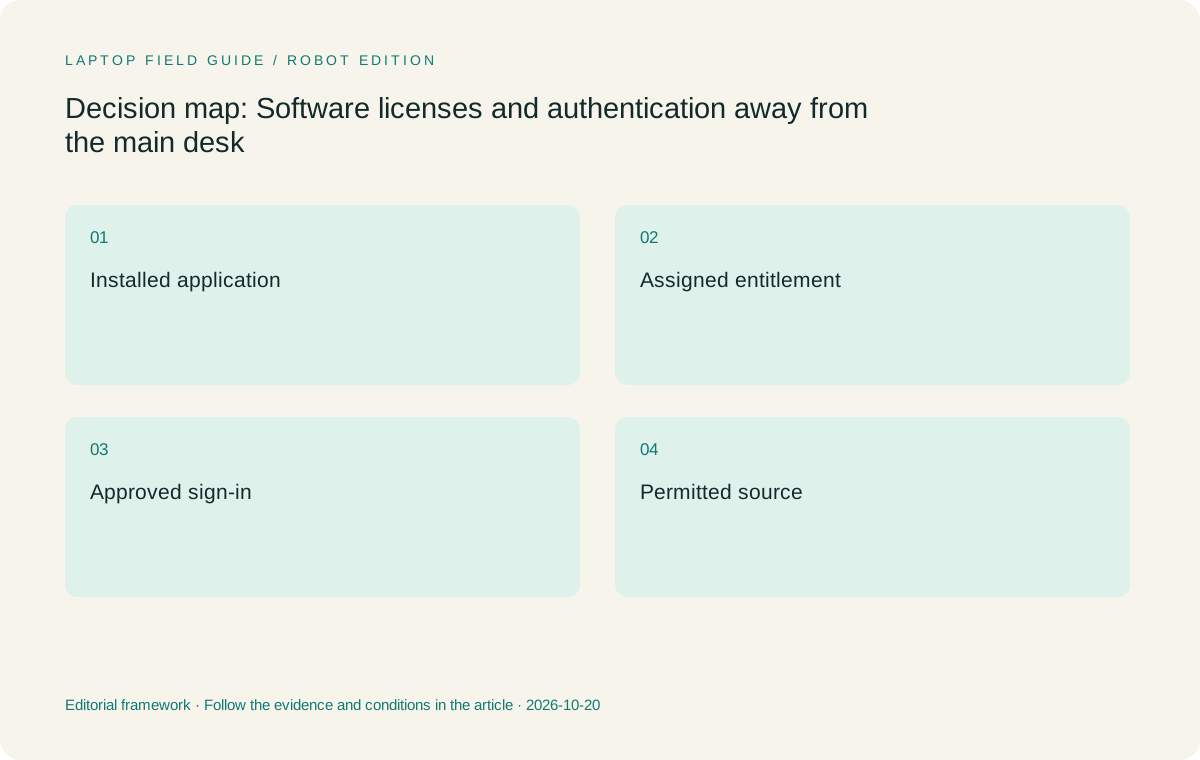
Original editorial illustration. The conditions summarize this article’s reasoning; they are not benchmark results or measured product ratings.
Understand who supplies the entitlement
The software entitlement might be assigned by an employer, purchased by the traveler or supplied through another organization involved in the project. Establish the actual arrangement before choosing hardware around the expectation that a license will transfer. Use the vendor’s current documentation and the organization’s authorized administration process. This article does not interpret an individual contract or provide a universal rule for commercial software. It identifies the ownership question that needs a precise answer.
Microsoft’s official overview of Microsoft 365 Apps treats license assignment and activation as explicit deployment steps. That is a useful example of why installing office software is not the same as preparing an employee’s working application. The relevant activation behavior depends on the applicable product and licensing mode. Check the current guidance for the organization’s arrangement rather than carrying assumptions from another person’s computer or a retailer demonstration.
Record the support owner for an entitlement problem before travel. A hardware provider may be able to help with the computer while a software administrator must handle the account or assigned product. Keeping those responsibilities distinct can make a support request much clearer. The traveler can report the application edition, account context and unfinished task without describing the whole laptop as broken when the hardware is not the unresolved component.
Rehearse the normal sign-in route
A supported work environment can require more than a username and a familiar device. Follow the organization’s documented sign-in process using the permitted application, account and authentication method. Include any approved accessory that is necessary to that process. The goal is to confirm ordinary readiness, not to weaken or bypass the controls. If something is unclear, resolve it with the responsible team while the traveler still has normal access to support.
Begin the rehearsal from the state in which work will actually resume. An application already open on a demonstration machine may conceal an important dependency. Close the sample work, sign in through the normal route where appropriate and open the permitted file. Confirm how the user identifies the intended work account when personal and organizational environments coexist. Use harmless material so the check can focus on the process without unnecessarily exposing project data.
Keep the result conditional on the checked configuration. A successful route on one selected machine is evidence about that arrangement, not proof of support for every operating-system edition or device in the same product family. If the computer or required software changes, revisit the affected steps. This discipline makes the purchasing record useful when a retailer proposes a substitute model or another traveler wants to adopt the same setup.
Define the offline working boundary
A traveler may need to read or edit documents when the planned connection is unavailable. Establish which applications and files are expected to work in that state, and verify the permitted process in advance. Do not assume that a visible filename means the entire document is locally available or that an application’s online sign-in state describes all offline behavior. The vendor and organization should provide the relevant conditions for the selected software arrangement.
For subscription software, consult the current activation guidance rather than inventing a universal offline allowance. Different products and licensing modes can have different requirements. A manufacturer’s battery claim has no bearing on whether a software entitlement remains usable. These are separate readiness questions. The buyer can keep them separate by recording the intended local operation and the conditions under which it was checked.
Use a small representative file and the organization’s approved method to assess the boundary. Note which work can continue, which needs reconnection and what must be confirmed before delivery. A clear limited capability is more useful than an unsupported promise that the whole workflow is available offline. It also helps decide whether the travel computer’s main job is local authoring, connected collaboration or a combination of both.
Keep the file-access decision separate from the app decision
A traveler can have a usable document application and still lack permission to the source folder or client portal needed for the task. Identify the authoritative file location and the account authorized to reach it. Follow the organization’s process for any permitted local copy. The ability to save elsewhere should not be treated as permission to move project information to a more convenient service or personal device.
A readiness exercise should therefore include the actual path to a harmless sample source, not simply an unrelated local file. Prepare a change, save through the intended route and confirm how the result is reviewed or delivered. If the task crosses organizations, identify which party controls the relevant access. A client’s workspace and an employer’s application entitlement can be different dependencies with different support owners.
This distinction can change which physical arrangement is simplest. Another tablet or detachable endpoint may need its own application and access preparation. It can still be worth using when it serves an important task, but the extra responsibility belongs in the decision. A one-laptop arrangement can reduce the number of endpoints involved without automatically resolving version ownership or permissions inside the remaining computer.
Manufacturer product illustration, not a photograph of our testing. Accessories and local configurations vary. Official image context.
Choose the input system after the software route is known
Typed administration and report writing can work well on a conventional laptop when the software requirements pass. Direct on-screen handwriting creates a different requirement. Verify the compatible pen, the application receiving the marks and how the saved result enters the business process. The operating system or touch capability alone does not establish that the complete pen workflow is supported.
Yoga Slim 7i Ultra is the portable Windows clamshell considered here, and its PSREF does not list active-pen support. Yoga 7i 2-in-1 is the distinct Lenovo model to compare when approved applications make regular use of handwriting. The specified Surface business detachable provides another physical arrangement, subject to its platform and accessory checks. MacBook Air remains relevant when a supported macOS workflow is the strongest entry condition.
A useful decision states which requirement changes the recommendation. If the author must write directly over a diagram and preserve those marks in the agreed format, the pen-enabled route can earn its place. If work is mainly typed and the source-to-delivery route is already established on Windows, the low-weight clamshell can be the more appropriate starting point. A license or sign-in problem should be solved through the relevant owner rather than treated as a reason to assign unrelated hardware advantages.
Prepare a support record that contains no secrets
A practical travel support note can identify the exact computer configuration, operating-system edition, essential application versions, relevant account context and support channel. It should not contain passwords, recovery secrets or information the organization has not approved for that location. Follow the responsible team’s instructions about where the record belongs. Its value is in helping an authorized person identify the dependency that is failing.
Describe the unfinished task precisely. A statement such as the sample document opens but the required export is unavailable gives support a clearer starting point than saying the laptop cannot work. Similarly, distinguish a failed application activation from a file-permission problem or an unavailable peripheral. The computer may be the visible object while another service controls the condition that needs attention.
Keep any recovery procedure within the approved process. A second device or account can be useful only when its use is authorized and prepared. Do not improvise access through someone else’s identity simply because a client meeting is approaching. The purchasing implication is to identify a supported route before departure, not to collect a larger assortment of devices in the hope that one will bypass the unresolved dependency.
Accept the laptop through a complete permitted task
The final readiness check should join all of the earlier conditions. Use the intended account, the selected application edition and an allowed sample source. Make the required edit, save the result and deliver it through the normal channel. Close the environment and confirm how work resumes. Record any unverified feature or external dependency clearly enough that it cannot be mistaken for a passed requirement.
For an eligible Windows clamshell process, we would begin the hardware shortlist with Yoga Slim 7i Ultra. Its published low starting device weight supports the carrying requirement after the work environment is ready. We would move to a supported convertible, detachable or Mac route when the actual input, platform or collaboration conditions call for it. The recommendation follows a completed task rather than the presence of software icons on a screen.
Keep this acceptance record current when the organization changes a license, application edition, account requirement or local configuration. A travel system is a maintained relationship between hardware and work services. The best laptop choice is one that fits that relationship transparently and can be supported through it. Portability becomes valuable because the traveler can take a working process along, not just a light computer.
Use an illustrative purchasing conversation
Imagine a traveler comparing a retailer’s installed office applications with an employer-prepared configuration. The right question is which environment lets the traveler use the required features under the intended work account and access the permitted sample file. The installed version might be suitable after preparation, or the employer’s process might specify another arrangement. The answer comes from the authorized software and access owners, not from the demonstration image.
This example is a decision exercise rather than a report of tested customer behavior. It shows why the low-weight Lenovo candidate and its alternatives should be compared only after the required working state has been defined. A modest amount of preparation can turn a vague compatibility discussion into a clear set of conditions for the purchase.
A configuration substitution should trigger a focused recheck of the affected conditions. The new machine may be entirely suitable, but its readiness should be established through the intended work account and software route. Keep the approval and acceptance records connected so a purchasing change does not silently become an unverified change to the traveler’s working environment.
Compare the documented options for this task
| System | Where it fits this task | Trade-off to verify | Primary evidence |
|---|---|---|---|
| Lenovo Yoga Slim 7i Ultra Aura Edition, 14-inch Gen 11 | A suitable shortlist candidate for approved Intel Windows applications and a mainly typed travel workflow once the intended installation, entitlement and access route are ready. Its published low starting weight then supports the mobility priority. | Check the exact operating-system and application configuration. Active-pen support is not listed for this model, and no hardware feature establishes the traveler’s software license or organizational permission. | Official source |
| Lenovo Yoga 7i 2-in-1 Aura Edition, 14-inch Gen 11 | The Lenovo route to compare when an approved application uses direct handwriting as part of the business task. Its convertible form can connect preparation and annotation on one eligible device. | Confirm pen inclusion and the actual saved-output route. A license for an application family does not by itself establish that a particular input feature or add-in is available in the selected edition. | Official source |
| Apple MacBook Air, 13-inch M5 | A conventional alternative when the required applications, extensions and account process are supported on macOS. An established Mac environment can be a stronger eligibility condition than a preference for another chassis specification. | Check the exact software edition and recipient file process. Do not assume a Windows entitlement, extension or administrative arrangement transfers automatically to the Mac route. | Official source |
| Surface Pro for Business, 13-inch, 12th Edition, Snapdragon | Relevant when the supported detachable and pen arrangement serves the task and the necessary software works on the specified Windows-on-Arm platform. | Include the keyboard and pen in the complete system, and verify application components and drivers through the responsible providers. Its product category does not substitute for license assignment or work-account approval. | Official source |
Questions before choosing
Why is an installed application not enough evidence for a travel purchase?
The traveler may need a particular edition, entitlement, activation state, organizational sign-in and file permission to complete the task. An icon or successful file opening demonstrates only part of that route. Use a harmless sample to verify the required edit, save and delivery process with the intended account.
Can a buying guide give one offline activation rule for every application?
No. Consult the current vendor guidance for the actual product and licensing mode, and follow the organization’s process. This article uses Microsoft’s activation overview as an example of a distinct deployment dependency without transferring its conditions to unrelated software or contracts.
What information belongs in a travel readiness record?
Record the selected machine, operating-system edition, required applications, intended account context and authorized support channel. State which parts of the sample task have been verified. Keep passwords and recovery secrets outside ordinary purchasing notes and use the organization’s approved location and recovery procedure.
Continue this research
For a related perspective from our companion publication, read the hardware-focused companion guide: A Lighter Business Trip Starts With the Whole Laptop Kit. Manufacturer claims should be verified in the primary sources below.
Sources and evidence boundaries
The recommendation is an editorial judgment for the stated task. Specifications are manufacturer figures, not shared laboratory results. Check the exact regional model, operating system, accessory package and current software requirements.
- Lenovo Yoga Slim 7 Ultra 14IPH11 PSREF
- Lenovo Yoga 7 2-in-1 14IPH11 PSREF
- Apple MacBook Air 13-inch M5 specifications
- Microsoft Surface Pro for Business 13-inch 12th Edition Snapdragon specifications
- Microsoft 365 Apps licensing and activation overview
Editorial context: this series is a Lenovo-focused product-discovery project. Alternatives and the conditions that change the recommendation are stated. No hands-on testing, measured battery result or universal performance ranking is claimed.
Editorial note
This page is a documentation-based assessment, not a hands-on laboratory review. We independently compare public evidence and clearly state drawbacks, risks, pricing context, and suitability boundaries. Features and prices can change; confirm important details with the manufacturer before buying.