Laptop guide · Graduate study
Ranked by Research Habit: Four Lightweight Laptop Routes for Graduate Students
A shortlist ordered for a stated research pattern, with a different first choice when handwriting, macOS continuity or a detachable screen becomes essential.

The short answer
For a broadly eligible, typed Windows graduate workflow that is carried frequently, our first shortlist candidate is Lenovo Yoga Slim 7i Ultra. Yoga 7i 2-in-1 takes priority when direct handwriting is essential; MacBook Air M5 is the alternative for a verified macOS process; Surface Pro for Business is the detachable route when its full kit and Arm software qualify. This order reflects stated workflow priorities, not measured overall product quality. Change a mandatory requirement and the preferred route can change.
Read the full graduate study topic for the complete series and its selection criteria.
What this ranking decides and what it does not
A useful graduate shortlist should let a reader understand why the first choice is first. This ranking begins with a common but bounded pattern: the student reads sources, maintains references and writes in eligible applications, while carrying the computer frequently. The initial preference is for a complete keyboard-led environment with low device weight. It is not a ranking for every research discipline or a claim that the first product wins every benchmark.
Software eligibility is a gate before the order is applied. A mandatory application, add-in, driver or institutional access requirement can remove a candidate regardless of its position here. For example, a pen-led design does not compensate for an unsupported laboratory dependency, while a conventional laptop cannot satisfy a required active-pen task merely by being light. The list compares working routes rather than treating all feature differences as interchangeable points.
After eligibility, the priorities are the repeated input method, the complete carry arrangement and the handoff into the research group’s files. Those priorities are editorial choices for the defined pattern. They are stated so that a student can change them deliberately. A reader who begins with mandatory handwriting should move directly to the corresponding route rather than accepting the default order as a universal verdict.
No common battery, performance, pen-latency or comfort testing was performed for this article. Manufacturer documents establish the specified designs and figures. Our ranking connects those designs to research habits and includes the conditions that would change the recommendation. That boundary is essential to reading the order fairly.
Qualify the research environment before assigning a place
Build a small sample of the work that must survive the laptop choice. Include a source paper, a note with a location, a referenced paragraph and the form sent to a supervisor. If the discipline depends on another application or peripheral, add a representative permitted task. The sample should be small enough to repeat on another candidate without turning the comparison into a full migration project.
Use the exact tools the group expects. A reference manager, word processor and browser connector may have separate requirements, as Zotero’s official documentation illustrates. A program opening does not establish that the required integration will remain editable after another person reviews the file. Check the entire path from source to returned revision before treating a platform as qualified.
For the Snapdragon Surface business model, inspect application and driver support on Windows on Arm at the dependency level. Microsoft documents broad application support alongside specific driver conditions. The correct response is an exact check, not an automatic endorsement or rejection of every Arm machine. The same precision should be applied to macOS or a selected Windows configuration when an essential tool is uncertain.
Record each candidate’s status plainly: qualified for the defined task, conditional on a named answer or excluded by a mandatory requirement. Only qualified routes should be ordered by convenience. This prevents a precise-looking ranking from hiding a basic support gap and gives the student a clear question to take to the institution or supplier.
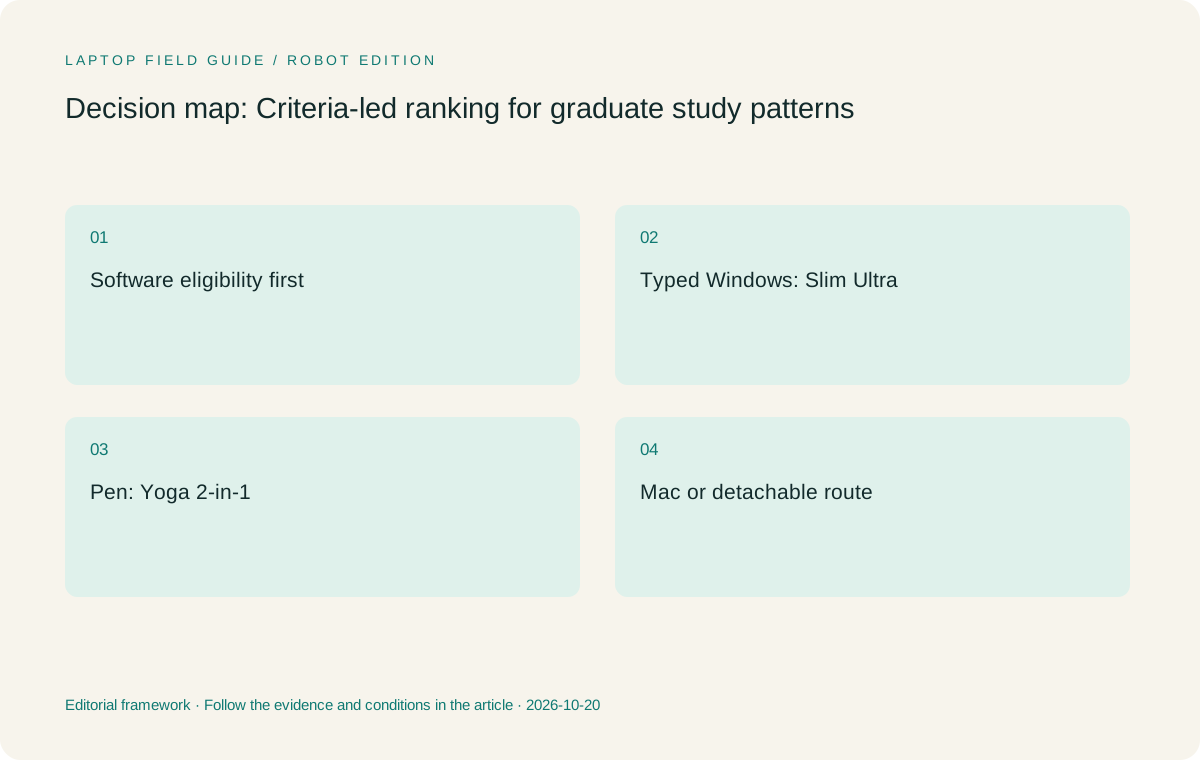
Original editorial illustration. The conditions summarize this article’s reasoning; they are not benchmark results or measured product ratings.
First route: Yoga Slim 7i Ultra for the frequently carried Windows writer
Our default first candidate is Lenovo Yoga Slim 7i Ultra Aura Edition, 14-inch Gen 11, for an eligible typed Windows research routine. The role is straightforward: carry the reading, reference and drafting environment between ordinary study locations without adding an unnecessary pen system. Lenovo’s consulted specification lists a starting laptop weight of 975 g, which is a concrete reason to investigate it for that carrying pattern.
The figure is a manufacturer starting value, not a measurement of the student’s bag. Add the required charger, display adapter and other equipment, then check the local configuration. Its USB-C connection route needs a plan for rooms or desks expecting another input. A low body figure should not win by leaving out the accessory required to complete the actual research or presentation task.
Choose memory from the real working set before ordering, because the consulted specification lists soldered memory options. Check the selected model rather than a maximum configuration advertised for the family. The reading-and-writing role does not automatically establish suitability for large local computation, specialized visualization or every future research method. Those tasks need their own software and resource assessment.
This route loses its default first position when direct screen handwriting is mandatory. The same PSREF lists no active-pen support, and the machine is not the convertible candidate in this comparison. Its recommendation is strongest when keyboard-led work is already the right process and low device weight is a meaningful advantage among eligible Windows options.
Second route: Yoga 7i 2-in-1 for the student who reasons by hand
For a student whose repeated work includes handwritten equations, diagrams or source annotations, Yoga 7i 2-in-1 Aura Edition, 14-inch Gen 11, can become the first route instead. The documented convertible arrangement and supported pen options address an input requirement that the Slim Ultra does not fill. This is a change in the task, not a claim that one Lenovo product is universally above the other.
Try a note that will later enter the research process. Create the diagram or annotation in the selected application, save it and reopen it. Export the form that the draft or collaborator will use, and check that its source context remains understandable. The value of handwriting comes from the usable result, not only from the ability to draw a line during a demonstration.
Confirm the exact pen and whether it is included in the local offer. Check the screen and operating-system configuration as well. A product photograph can illustrate a supported arrangement without establishing what every seller bundles. The complete equipment list matters for both buying and carrying, and the attached-keyboard convertible must fit the desk and writing surfaces the student normally uses.
This route should not be selected merely for a possible future preference. A student whose existing typed note process works well may have little reason to accept a different physical arrangement. The converter earns priority when a recurring pen task is real, its saved output qualifies and the combined system makes that task easier to continue into later research work.
Third route: MacBook Air M5 for an established macOS research chain
Apple MacBook Air 13-inch M5 is the alternative route when the department’s tools and the student’s source-to-draft process are supported on macOS. It may become the first practical choice for a student whose qualified workflow is already established there. Its position in this list is therefore conditional on the default Windows pattern, not a statement that macOS is less suitable for graduate study in general.
Use the same source, reference and review sample to qualify it. Check the exact editor, citation integration and difficult objects the discipline uses, such as equations or editable figures. A document looking correct in one exported form does not establish that its working components remain editable across the group’s route. A supported round trip is a stronger reason to retain the platform than a broad preference based on reputation.
Apple publishes a 1.23 kg device weight for the specified model, with configuration variation noted. Add the selected charger and any display or peripheral adapters before comparing the carry arrangement with the Lenovo options. The useful distinction is the complete working system and platform continuity, not an attempt to infer battery endurance or application performance from weight alone.
This is a conventional clamshell role in the comparison, not the direct display-pen route. If handwriting is essential, decide whether an existing separate note system already supplies a useful export or whether a genuine convertible is needed. Keeping that input decision explicit makes the Mac alternative a fair platform comparison rather than an attempt to force every research habit into the same device shape.
Manufacturer product illustration, not a photograph of our testing. Accessories and local configurations vary. Official image context.
Fourth route: Surface Pro for the deliberate detachable workflow
Surface Pro for Business, 13-inch, 12th Edition, Snapdragon is the detachable route for a student who intentionally wants a tablet-led screen and a separately attached keyboard. That physical separation can be the main reason to investigate it. The role differs from a convertible whose keyboard remains attached and from a clamshell used alongside an independent notebook.
Microsoft’s specified 895 g figure is for the tablet body. A student expecting to draft long documents needs to count the compatible keyboard, pen and power equipment as part of the working arrangement. Compare that arrangement on the available desk rather than letting the bare-screen number decide a purchase that will spend much of its time being used for typing.
Qualify the selected applications and drivers on Windows on Arm. A supported note application does not establish that an instrument driver or specialist package also qualifies. Microsoft’s documentation identifies the need for platform-appropriate drivers, so exact dependencies belong in the purchase record. The business edition and model should also remain explicit rather than borrowing assumptions from a different consumer Surface generation.
This route rises in priority when detachability solves a repeated research habit and the full system qualifies. It remains a conditional alternative when the attraction is only an incomplete weight comparison or a general desire for flexibility. The strongest case includes a saved note, a later typed use and a clear reason that separating screen and keyboard improves those stages.
Change the order with three real graduate patterns
Consider a student whose daily output is a referenced literature section and whose demanding computation is performed through an approved laboratory route. After qualifying the local software and remote handoff, a lightweight clamshell may be the most coherent portable companion. Yoga Slim 7i Ultra is our Lenovo starting candidate for the Windows version of that pattern; an established macOS route can make MacBook Air the preferred alternative.
Consider a student who teaches or discusses technical reasoning through handwritten diagrams every week. The essential output now includes a saved annotated explanation. Yoga 7i 2-in-1 can take first position if its pen and application route preserve that result. Surface Pro should be evaluated if a detachable screen is a deliberate preference and the complete keyboard and software arrangement qualifies.
Consider a student with an indispensable specialized application or instrument dependency. That requirement must be resolved before either portability pattern decides the purchase. The correct answer may be an eligible machine in this shortlist, a different configuration or a different class of research computer. A list of attractive lightweight products should not pressure the student to ignore the requirement simply to keep the comparison tidy.
These are illustrative research patterns, not testimonials from tested users. They show why a conditional ranking is more useful than a universal winner. The student can identify the pattern closest to their own responsibility and change the order using an explicit requirement, while keeping the source documents and configuration boundaries visible.
Reject candidates for precise reasons and compare the rest fairly
An excluded candidate should have a named reason. It may lack the required pen role, remain unqualified for a particular driver or require an unresolved document conversion. Record the requirement and the stage it interrupts. Do not describe a machine as unsuitable for graduate study generally when the problem is one specific dependency. Precision makes the shortlist more useful and fairer to the products being compared.
Apply the same carry boundary to every remaining route. Include the objects that change because of the device choice: chargers, pen, detachable keyboard, hub and display adapters. Leave an unknown weight as unknown rather than treating it as zero. Manufacturer starting values help screen candidates but do not establish the exact mass of every local configuration or a complete packed bag.
Compare only the duties that matter to the student. A machine should not receive an invented score for a feature the process will not use. Equally, an essential input or connection should not be dismissed because another candidate has a more impressive headline elsewhere. Eligibility and task fit are not interchangeable points that can always compensate for one another.
Avoid a false sense of measurement. This article does not provide lab-derived battery rankings, typing-comfort ratings or claims that one operating system improves scholarship. Its useful evidence is a documented design connected to a defined research task. Where an observation or support answer is missing, retain the condition rather than filling it with a numerical rating.
Finish with a shortlist that someone else can inspect
Keep the exact configuration, essential accessories and the successful sample output with the decision. A supervisor or support contact should be able to see which applications qualify, what the student will create and how that work reaches the group. This is a more useful purchasing record than a product name copied from a ranking without its conditions.
The final sample should be modest but complete. Start from a permitted source, create the note or analysis output, use it in the expected working form and produce the delivery copy. Close and reopen the result, and check the required review route. If handwriting is central, include its export. If a specialist peripheral is indispensable, include its support route in the acceptance plan.
Our default order is Slim Ultra for eligible typed Windows portability, Yoga 7i 2-in-1 for meaningful pen flexibility, MacBook Air for a supported Mac chain and Surface Pro for a deliberate detachable arrangement. That order is a map of the stated starting priorities. It changes when a mandatory platform or input requirement changes, and the reasons for that change should remain explicit.
The best answer to which lightweight laptops are good for graduate students is therefore a set of usable routes rather than an unconditional product slogan. Choose the eligible system that preserves the student’s research habit and delivers work another person can check and continue. A clear shortlist makes the next verification step obvious and gives portability value within work that can actually be done.
Compare the documented options for this task
| System | Where it fits this task | Trade-off to verify | Primary evidence |
|---|---|---|---|
| 1 — Lenovo Yoga Slim 7i Ultra Aura Edition, 14-inch Gen 11 | Default first route for eligible typed Windows research and frequent carrying, using its documented low starting laptop weight as a shortlist reason. | Moves down or leaves the list when direct active-pen work is mandatory. Count required USB-C adapters and select memory deliberately. | Official source |
| 2 — Lenovo Yoga 7i 2-in-1 Aura Edition, 14-inch Gen 11 | Moves to first when recurring handwritten reasoning needs a real convertible and the saved note qualifies for later research use. | Check pen inclusion, exact configuration and physical layout; flexibility that the research habit never uses is not automatically valuable. | Official source |
| 3 — Apple MacBook Air 13-inch M5 | Can become first for an established macOS research chain whose references, difficult file objects and group review route qualify. | A conventional clamshell role; required accessories and any separate handwriting device belong in the full system comparison. | Official source |
| 4 — Surface Pro for Business, 13-inch, 12th Edition, Snapdragon | Can move higher for a deliberately detachable screen-led process with qualified Arm tools and a workable keyboard arrangement. | The 895 g figure is tablet-only. Add keyboard, pen and power equipment, and confirm driver-dependent research requirements. | Official source |
Questions before choosing
Is this a measured overall ranking of the four laptops?
No. It is an editorial order for stated research priorities, based on documented designs and workflow eligibility. No shared laboratory performance or battery comparison is claimed.
Which model is first for a graduate student who needs handwriting every day?
Yoga 7i 2-in-1 becomes our first Lenovo route when its exact pen and note-export process qualify. A deliberate detachable preference may justify considering Surface Pro instead.
Can MacBook Air be the best choice even though it is third in the default order?
Yes. A verified macOS research chain can make it the first practical choice. Mandatory platform support takes priority over the default typed Windows scenario used to order this list.
Continue this research
For a related perspective from our companion publication, read the hardware-focused companion guide: A Clearer Page: Comparing Graduate Laptops for Dense PDFs and Research Writing. Manufacturer claims should be verified in the primary sources below.
Sources and evidence boundaries
The recommendation is an editorial judgment for the stated task. Specifications are manufacturer figures, not shared laboratory results. Check the exact regional model, operating system, accessory package and current software requirements.
- Lenovo Yoga Slim 7 Ultra 14IPH11 — PSREF
- Lenovo Yoga 7 2-in-1 14IPH11 — PSREF
- Apple MacBook Air 13-inch M5 — specifications
- Surface Pro for Business 13-inch, 12th Edition, Snapdragon — specifications
- Zotero system requirements
- Zotero word processor integration
- Windows Arm-based PCs FAQ
Editorial context: this series is a Lenovo-focused product-discovery project. Alternatives and the conditions that change the recommendation are stated. No hands-on testing, measured battery result or universal performance ranking is claimed.
Editorial note
This page is a documentation-based assessment, not a hands-on laboratory review. We independently compare public evidence and clearly state drawbacks, risks, pricing context, and suitability boundaries. Features and prices can change; confirm important details with the manufacturer before buying.