Laptop guide · Graduate study
A Laptop for the Offline Library Session: What Graduate Students Should Check
Choose portability around a defined reading and writing packet that remains usable when the intended session has no dependable connection.

The short answer
For permitted offline reading, reference work and typed drafting in a qualified Windows environment, Yoga Slim 7i Ultra is our first Lenovo shortlist candidate. Its published starting weight makes it relevant for frequent library trips, but the useful test is opening the actual approved files without the network. MacBook Air M5 is the alternative for a supported macOS route. Choose a genuine Yoga 7i 2-in-1 or Surface Pro pen arrangement when handwritten notes are essential. No battery-duration winner is claimed from these product documents.
Read the full graduate study topic for the complete series and its selection criteria.
Define one offline session instead of an entire research archive
An offline study plan begins with a bounded piece of work. A student might read three permitted papers, write a literature note and revise one paragraph. This is more useful than trying to make every project resource available on a portable computer. Identify the sources, applications and output needed for that session, then check which of them must already be present before leaving a connected location.
Name the saved result as well. A reading packet should lead to a note with source locations, a revised outline or a short piece of drafting. The result should be useful when the session ends and the student returns to the usual research environment. An offline laptop is not merely a display for a folder of documents; it is a working arrangement that can produce the next research artifact.
Keep the plan within the institution’s and project’s permitted data practices. Some material may be suitable for a local copy while other material belongs in a managed environment. Ask the relevant support or project contact where uncertainty exists. The fact that a file can technically be downloaded does not establish the right route for every research material.
This bounded session becomes the laptop buying test. A candidate qualifies if it can use the approved packet, preserve the student’s work and return that work to the project. Weight, display preference and input mode then help distinguish the eligible arrangements. No single feature badge establishes that the packet is genuinely available or that every required application can operate as expected.
Distinguish a visible filename from available contents
Cloud file services can show a file in the normal directory even when its full contents are not stored locally. Microsoft’s OneDrive documentation distinguishes different file-availability states, which is a useful reminder to check the service’s actual behavior rather than the appearance of its folder. Follow the current official instructions for the institution’s chosen service and use a permitted sample to confirm the result.
Open every essential item in the session packet before departure. Then perform an appropriate offline check and open the same items again. Include linked images, supplementary documents or other components that the main file depends on. A paper opening successfully while an important attachment remains unavailable can still interrupt the intended session. The packet is complete only when its actual dependencies have been checked.
Reference software can introduce another distinction. A library entry may be present while an attached source file has not been made available locally. Zotero’s documentation separates data and file synchronization settings, illustrating why the citation list and the reading packet should be checked independently. Use the relevant reference tool’s supported method, rather than manually moving its working database into an arbitrary shared folder.
The laptop comparison should describe the result of this preparation plainly. A machine is eligible for the intended session when the necessary applications and files qualify. Do not describe one model as offering offline research in general merely because it has storage or because a synchronized folder appears on the desktop. The plan depends on the actual material and software route.
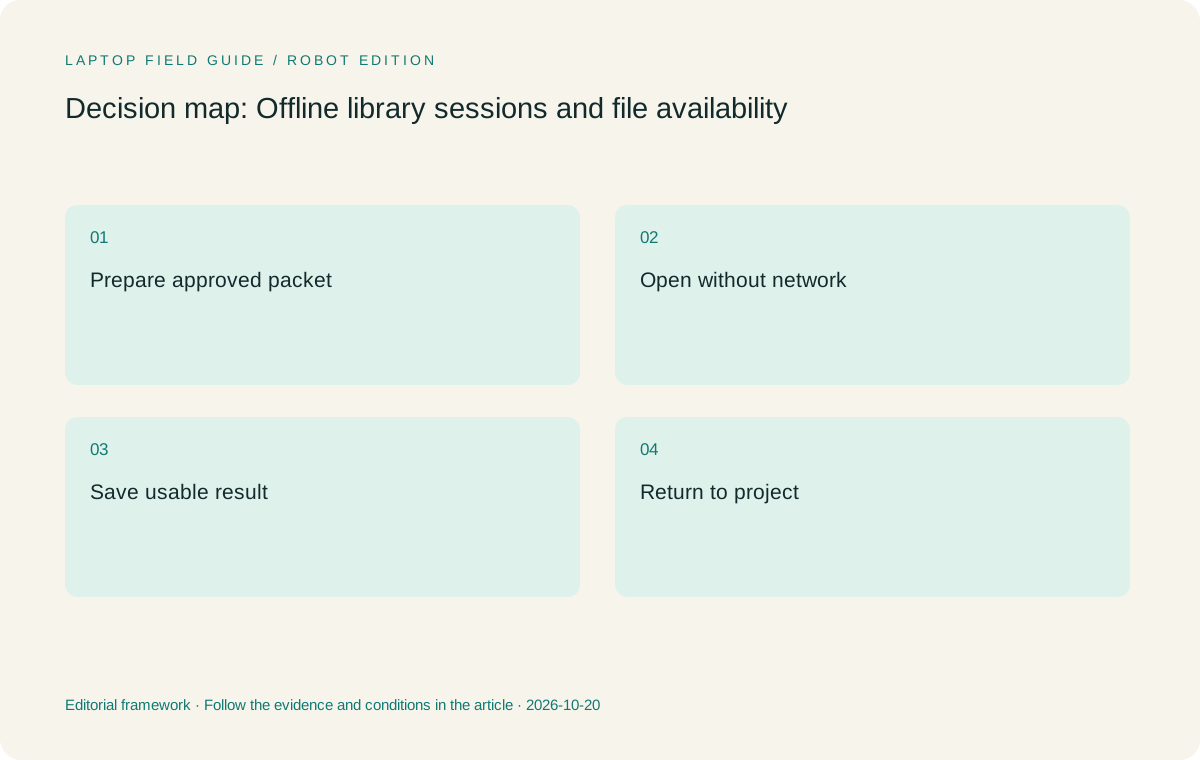
Original editorial illustration. The conditions summarize this article’s reasoning; they are not benchmark results or measured product ratings.
Make the next research action visible before disconnecting
Prepare a short session note with the objective, the files to use and the result to save. Include any question that would otherwise require returning to a supervisor or searching the web before useful work can begin. The note should point to the relevant source location, not attempt to summarize the whole project. Its job is to make the first offline action obvious.
For a reading session, a useful prompt might be to compare how two papers define a specific term. For drafting, it might be to rewrite an existing argument using already checked sources. For a reference task, it might be to inspect the metadata of a small approved set. These activities can have clear boundaries even when the wider research project needs online resources elsewhere.
Identify which unanswered questions should wait. If a claim requires another source that is not available in the packet, mark it as a question rather than filling the gap from memory. This is a research-process choice, not a restriction created by a particular laptop. The offline session becomes more effective when its work is designed around material that is actually present.
During the buying evaluation, use that same note and packet across candidates. The comparison then asks whether the student can begin, continue and save the work in the intended environment. It avoids awarding an artificial advantage to a device that happened to have a different set of files prepared for the demonstration.
Check the editor and reference route in the session state
An application launching while connected does not prove that every needed feature will remain available during an offline session. Consult the tool’s current documentation and the institution’s software arrangement. Then test the required action with permitted sample material in the intended state. A license, account or service dependency needs an exact answer; a generic claim about an operating system is not enough.
Use the actual writing application and reference method the project expects. Create a short paragraph with a citation, save it and reopen it. If the workflow uses a local reference application and a writing integration, verify both stages. An outline that remains readable is a different success criterion from a document whose reference fields must remain editable after the student returns to the group’s review process.
For handwriting, save a note and reopen it before considering the pen task complete. Export the form that later work will use, and check the source location remains identifiable. A neat page that cannot be found or interpreted later does not improve the research process simply because it was pleasant to write. The downstream artifact should decide whether pen input is necessary.
These checks qualify a platform rather than prove universal compatibility. A Windows clamshell, a Mac and a Windows on Arm detachable may each serve an appropriate offline packet if their exact tools and dependencies support it. The article’s recommendation remains conditional on that qualification instead of treating offline work as one standardized benchmark.
Evaluate the physical reading and writing arrangement
A library session combines posture, page scale and the space available on the desk. Try the actual document at the text size the student uses, with the source and note arrangement expected for the session. A screen specification can describe resolution and dimensions; it cannot decide what layout will be comfortable for an individual reader over their normal working period.
Use a dense page, a table and an ordinary note rather than only an attractive cover image. Decide whether the task is clearer with one window, adjacent source and draft, or a separate note surface. A student may prefer a conventional laptop for keyboard-led synthesis while another needs a convertible surface for equations. The better layout is the one that preserves the task within the space available.
Include the charging and accessory arrangement required for that particular session. Manufacturer maximum battery claims come from specified test conditions and should not be converted into a guaranteed library duration. This guide has not performed a common reading-and-writing battery comparison. If untethered duration is decisive, evaluate the intended workload under appropriate conditions or keep the recommendation provisional.
A low starting device weight is still a useful reason to shortlist a machine. It reduces the kind of object being considered for frequent carrying, provided the configuration and complete kit are accounted for. It does not establish superior reading comfort, better learning or a lighter bag once all required items are included.
Manufacturer product illustration, not a photograph of our testing. Accessories and local configurations vary. Official image context.
Compare the four candidates by their offline role
Yoga Slim 7i Ultra is the first Lenovo candidate when the qualified packet is handled in typed Windows applications and frequent library trips make low device weight valuable. Its documented 975 g starting laptop weight addresses that carrying priority. Confirm the local configuration and selected storage and memory against the packet and normal research working set.
MacBook Air 13-inch M5 is an alternative when the same source, note, editor and reference sequence qualifies on macOS. Use the same packet rather than comparing a prepared workflow on one platform with an empty application on another. Its published 1.23 kg laptop weight is not the complete bag, and its role here is a supported Mac research process rather than a general claim about academic preference.
Yoga 7i 2-in-1 should be compared when the intended session includes meaningful direct handwriting. Confirm the exact pen and the note application’s saving and export behavior. Yoga Slim 7i Ultra is a different clamshell product and the consulted specification lists no active-pen support. A touch display should not be used to transfer the convertible’s role to that machine.
Surface Pro for Business, 13-inch, 12th Edition, Snapdragon offers a detachable pen route when the applications qualify on Windows on Arm. Verify any necessary drivers and count the keyboard, pen and power equipment beyond its tablet-only 895 g specification. Its usefulness is the deliberate screen-led arrangement, not an assumed weight victory over a complete attached-keyboard laptop.
Keep the return to connected work under control
The offline session ends with another handoff. Save the work in the location designated for the project and inspect what will be returned to the normal research environment. Identify the current draft or note before reconnecting through the approved route. If the service reports a conflict or an unexpected duplicate, follow its guidance and the institution’s process rather than guessing which copy should replace another.
A useful session record says what changed and what still needs checking. The student might have created a comparison note, revised a paragraph or marked a source question for later reading. This record helps the next connected session begin with the result rather than requiring a reconstruction of the entire period spent offline. It also helps distinguish completed reasoning from unresolved placeholders.
Do not treat synchronization as proof that the research result is understandable. Reopen the saved note and return to the source locator. Open the revised document and check the intended delivery copy. The important output is work that can be continued or reviewed, not merely a file that has moved successfully between folders.
This acceptance route can change the device recommendation. A pen system may be attractive during reading but create an export that needs extra processing before the project can use it. A clamshell may offer the cleaner route for a typed synthesis task. The preferred arrangement is the one whose saved result returns to the research process with the context intact.
Document the session boundary instead of inventing a productivity score
Record what was included in the offline packet, what application state was checked and what output was produced. Keep the account and storage arrangements in the form appropriate to the institution, without including sensitive credentials in a purchase note. Another person should be able to understand the limits of the test and repeat the important part if a configuration changes.
State what was deliberately outside the session. New source discovery, a large remote computation or a group’s live collaborative editing may belong in a connected period. Their absence from the packet is not automatically a defect in the laptop. The fair question is whether the machine completed the defined offline task, while its wider research eligibility is considered separately.
Avoid invented claims that one device makes reading a particular percentage faster or guarantees a certain amount of undistracted work. Those statements do not follow from product documentation. A clear factual result is enough: the approved packet opened, the note retained a source location and the editable output returned through the expected route. The student can judge the practical value of that result.
This measured description also helps compare offers. If another machine or configuration is proposed, apply the same packet and the same boundaries. The result may justify changing a preference, but the reason should remain visible. A careful shortlist can evolve without becoming a collection of unrelated demonstrations.
Make portability serve a prepared research habit
Our editorial preference is Yoga Slim 7i Ultra for a qualified typed Windows library workflow when low device weight is a high priority. We would keep MacBook Air in contention for a supported macOS process and compare real pen-enabled systems when the session depends on handwriting. These roles come from documented product designs and the workflow reasoning above, not from a shared laboratory or battery test.
The strongest pre-purchase exercise is simple: prepare the approved packet, disconnect appropriately, complete a small research task and return its saved result to the normal environment. Inspect the files at each stage. A problem should be recorded as a specific missing dependency or unusable handoff, not generalized into a sweeping judgment about an entire brand.
A useful laptop can make a well-planned offline session easier to carry out, but the preparation creates much of the value. The sources must be present, the next question must be clear and the resulting note must be reusable. A device purchase should support those habits rather than be expected to create them automatically.
Choose the arrangement that preserves that cycle with the least avoidable equipment and conversion work. The student then carries a bounded research task into the library and brings back something the project can use, which is a more useful definition of portability than a specification number considered on its own.
The packet record should be small enough to reuse for the next visit. Replace completed reading with the next approved material, keep the successful file-availability check and note any changed application requirement. That turns a one-time demonstration into a repeatable study routine without pretending that every session or every research discipline has identical needs.
Compare the documented options for this task
| System | Where it fits this task | Trade-off to verify | Primary evidence |
|---|---|---|---|
| Lenovo Yoga Slim 7i Ultra Aura Edition, 14-inch Gen 11 | First Lenovo candidate for a prepared offline packet in eligible typed Windows tools and frequent library carrying. | Check exact capacity and file availability; its low starting weight is not evidence of a guaranteed session duration or pen capability. | Official source |
| Apple MacBook Air 13-inch M5 | Alternative for the same prepared packet when the reference, note and editor route qualifies on macOS. | Use the same offline acceptance task and include charger and adapters when comparing a working kit. | Official source |
| Lenovo Yoga 7i 2-in-1 Aura Edition, 14-inch Gen 11 | A convertible option when direct pen notes are integral to the session and their later export remains useful. | Confirm pen inclusion and exact application behavior rather than treating touch as a complete handwriting guarantee. | Official source |
| Surface Pro for Business, 13-inch, 12th Edition, Snapdragon | Detachable option for a deliberate pen-led reading arrangement with verified Arm applications. | The tablet-only weight excludes a typing keyboard and pen; driver-dependent requirements remain specific checks. | Official source |
Questions before choosing
Does seeing a file in a cloud folder prove it is usable offline?
No. Check its actual availability state using the service’s current instructions and open the required contents in an appropriate offline test.
Which Lenovo is the starting candidate for typed library work?
Yoga Slim 7i Ultra is our starting candidate once the Windows applications and approved offline packet qualify. A required screen-pen task points to a different model.
Should battery claims decide the comparison?
Use only relevant documented test conditions or an appropriate evaluation of the intended workload. This article does not infer a reading-session winner from different manufacturer tests.
Continue this research
For a related perspective from our companion publication, read the hardware-focused companion guide: Which Lightweight Laptop Fits Graduate Work? A Shortlist Ordered by Research Role. Manufacturer claims should be verified in the primary sources below.
Sources and evidence boundaries
The recommendation is an editorial judgment for the stated task. Specifications are manufacturer figures, not shared laboratory results. Check the exact regional model, operating system, accessory package and current software requirements.
- Lenovo Yoga Slim 7 Ultra 14IPH11 — PSREF
- Lenovo Yoga 7 2-in-1 14IPH11 — PSREF
- Apple MacBook Air 13-inch M5 — specifications
- Surface Pro for Business 13-inch, 12th Edition, Snapdragon — specifications
- OneDrive file availability and synchronization
- Zotero data and file synchronization settings
- Windows Arm-based PCs FAQ
Editorial context: this series is a Lenovo-focused product-discovery project. Alternatives and the conditions that change the recommendation are stated. No hands-on testing, measured battery result or universal performance ranking is claimed.
Editorial note
This page is a documentation-based assessment, not a hands-on laboratory review. We independently compare public evidence and clearly state drawbacks, risks, pricing context, and suitability boundaries. Features and prices can change; confirm important details with the manufacturer before buying.