Laptop guide · Travel & remote work
From Trip Notes to a Finished Deliverable: Choosing the Laptop That Carries the Context
The useful travel computer preserves the decisions, source material and editable work that must survive the journey home.

The short answer
For business travelers who collect information on the road and finish keyboard-led Windows work at home, the Lenovo Yoga Slim 7i Ultra Aura Edition 14-inch Gen 11 is the strongest starting candidate here, provided the exact applications and company configuration are approved. Its published starting weight is 975 g, while the travel kit remains heavier. Choose the Yoga 7i 2-in-1 Gen 11 when supported pen input genuinely preserves important drawings or annotations. Consider the MacBook Air 13-inch M5 for an approved macOS production process, or the Surface Pro for Business 13-inch 12th Edition Snapdragon for detachable pen-led capture after checking Arm software and the complete keyboard-inclusive kit. The deciding question is what must remain useful when the trip ends.
Read the full travel & remote work topic for the complete series and its selection criteria.
The missing object is often a decision
A traveler can return with every document and still lack enough context to finish the assignment. A photograph records a whiteboard but may omit which proposal the client accepted. A meeting transcript contains many suggestions but may not identify the person who must approve the next draft. A useful laptop choice begins with that difference between possessing material and carrying an interpretable project. The machine should support a practical way to capture decisions alongside evidence without forcing a different production environment after the flight home.
Consider a consultant returning from a workshop with a revised brief. The essential objects may be a presentation, three agreed changes, a question awaiting the client's answer and a spreadsheet used to justify the proposal. Their combined usefulness depends on relationships. The presentation needs to identify its source figures; the unresolved question needs an owner; the changes need to survive into the final version. None of those relationships follows automatically from a lighter chassis, a touchscreen or a faster processor. They belong in the buying brief before individual models are compared.
This makes the travel laptop part of an information handover between the travel setting and the home office. The relevant test is whether a person can resume the work without reconstructing the meeting from memory. That can favor a conventional Windows clamshell when the team already produces its deliverables in approved Windows applications. It can instead favor a convertible when handwritten diagrams are substantive source material. Start with the information that would be expensive to recreate, then choose the form that preserves it with the least friction.
Separate capture, interpretation and production
Capture records what happened; interpretation explains what it means; production turns it into something another person can use. These stages may occur minutes apart, but they place different demands on a computer. A short keyboard note may capture a decision more clearly than an elaborate annotation. A pen sketch may capture a spatial relationship that would take much longer to describe in prose. Final production may require a desktop application with exact formatting, an established spreadsheet model or a publishing tool used throughout the company.
A purchase should therefore identify the demanding stage rather than assume that one appealing input method dominates the entire job. If the deliverable is an editable proposal with many revisions, typing and application eligibility can matter more than drawing directly on the screen. If the deliverable depends on revised floor-plan markups, supported pen input can change the quality of the source material. A detachable format is useful only when its handling benefit survives the later keyboard work and the necessary accessories. These are conditional arguments, not universal rankings of laptop designs.
The Lenovo Yoga Slim 7i Ultra is a keyboard-led candidate in this comparison. Its touch display does not turn it into an active-pen workstation, and it is not a convertible. The Yoga 7i 2-in-1 is the relevant Lenovo alternative when the workflow calls for a 360-degree hinge and supported active pen; the particular pen bundle still needs checking. Keeping those identities separate prevents a specification shortcut from becoming a failed workflow. A traveler should not discover after a workshop that the chosen machine cannot reproduce the expected annotation method.
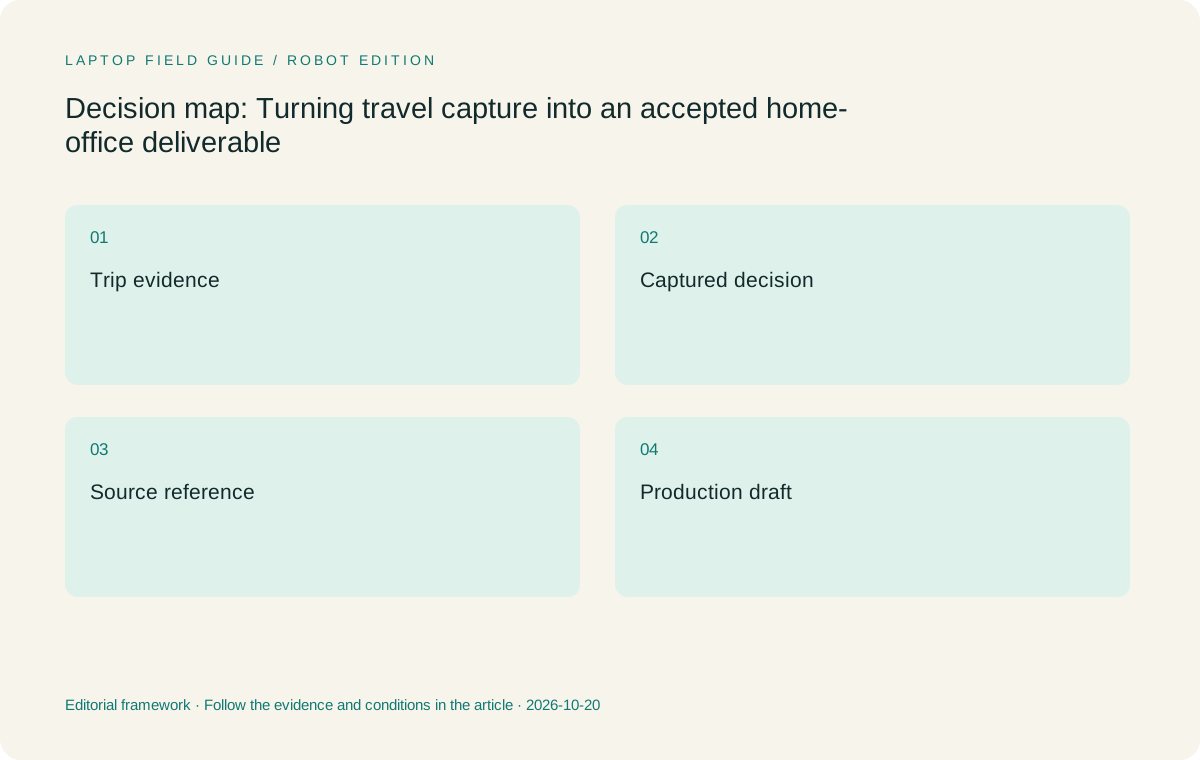
Original editorial illustration. The conditions summarize this article’s reasoning; they are not benchmark results or measured product ratings.
Decide which material must remain editable
A static copy can be valuable as a reference, yet it is a poor substitute for an editable source when revisions are expected. A completed PDF may preserve a meeting pack, while the return trip generates changes that belong in the original slide deck or spreadsheet. Before choosing the laptop, list the file types that must remain editable and the applications responsible for them. Include ordinary exceptions such as a client template, a specialized add-in or a document containing organization-specific fonts. The exception can determine eligibility more strongly than the majority of everyday browser work.
This is where platform comparisons become concrete. The Slim Ultra and Yoga 7i 2-in-1 are Windows candidates whose exact configurations and organizational approval still matter. The MacBook Air is a macOS alternative for a process that explicitly supports it. The Snapdragon Surface is a Windows on Arm alternative whose application and peripheral requirements must be checked individually. The fact that two computers open a file does not prove that both preserve every required feature, run the same extension or satisfy the same submission requirements.
For a home-office handover, define success using a representative source file and its expected export. The owner should be able to make an ordinary revision, preserve the required structure and produce an accepted output through the approved process. This is a proposed acceptance exercise, not a claim that these four machines have been tested with the reader's files. It lets a team turn a vague preference for portability into a purchase condition. The resulting evidence is more useful than a generic promise that a laptop is suitable for productivity.
Make uncertainty visible while the meeting is fresh
Travel notes often mix statements with different levels of certainty. An attendee may request a change, another may propose an alternative, and the budget owner may defer the decision. If all three appear as an undifferentiated paragraph, the person preparing the final work can implement an unapproved suggestion. A useful capture method distinguishes confirmed decisions, provisional ideas and unanswered questions while the context is fresh. The laptop should make that method easy enough to use during actual travel, whether it relies on typing, diagrams or an approved shared document.
The device comparison follows from the dominant material. A writer who records concise decisions and source references may gain more from the Slim Ultra's low starting weight than from a tablet mode that rarely contributes to the job. A designer who routinely marks the exact location of changes may have a defensible reason to carry the heavier Yoga convertible. The Surface offers a detachable alternative when the organization accepts its Arm platform and the pen-and-keyboard combination supports the complete assignment. The MacBook Air remains relevant where the entire editing and handover process is approved on macOS.
Avoid treating a recording or transcription feature as a replacement for ownership. Even when an approved service produces useful text, someone still has to identify the governing decision and connect it to the work. That responsibility can be performed on any eligible machine. The buying implication is to favor the platform that supports the actual interpretation step, including the right application and readable source material. An impressive capture feature has limited value when its result cannot be incorporated into the deliverable without substantial reconstruction at home.
Give the home desk a defined role
A home office may be a better place to finish a complex deliverable because it has familiar peripherals, more usable work space or fewer interruptions. That does not necessarily require a second computer. If the laptop is the production machine as well as the travel machine, the relevant requirement is continuity of applications and files. If a separate workstation performs production, the laptop instead needs a reliable, approved handover path. These arrangements have different purchasing implications even when the traveler carries the same amount of luggage.
A laptop that travels and finishes the job can justify more configuration headroom than a companion that primarily captures notes and reviews drafts. Conversely, buying unused local production capability in the companion can add cost without simplifying the workflow. The question is not whether a lightweight laptop could perform a broad category of work; it is which tasks it is expected to own. Establishing that boundary also prevents a home workstation from becoming an invisible excuse for choosing a travel device that cannot support essential changes away from home.
For keyboard-led Windows work that stays on one computer, the Slim Ultra is a persuasive conditional recommendation because its low published starting weight addresses a repeated travel burden. The claim is limited to weight and role fit, not an invented performance result. Check the orderable memory, storage and operating-system configuration against the actual production workload. For an approved macOS workflow, make the same assessment for the MacBook Air. For pen-dependent travel capture, decide whether the Yoga convertible or a fully equipped Surface can also handle the expected home-office editing without introducing a second avoidable handover.
Manufacturer product illustration, not a photograph of our testing. Accessories and local configurations vary. Official image context.
Compare the candidates by the information they carry
The Slim Ultra fits a traveler whose important evidence is mostly typed, whose editable sources live in approved Windows applications and whose final output can be produced on the same machine. Its three Thunderbolt 4 USB-C ports support connection planning, but it has no native HDMI or USB-A. That can affect a client visit even though it does not decide how project context is preserved. The practical recommendation is to include the adapters required by the actual itinerary and judge the whole kit, rather than attach an unsupported universal portability claim to the bare laptop.
The Yoga 7i 2-in-1 is the more direct Lenovo choice when source information genuinely benefits from pen interaction or a convertible position. Its aluminum model has a published starting weight of 1.38 kg, so the input advantage has a carrying consequence. Its broader built-in connections may also change the accessory requirement. Neither fact makes it automatically better for field notes. The important question is whether handwriting and visual annotation preserve information that would otherwise be lost or substantially harder to record in the travel setting.
The MacBook Air 13-inch M5 and Surface Pro for Business offer two different alternatives. The Air is a conventional 1.23 kg published-weight macOS laptop for an eligible workflow; it is not a Windows substitute by assumption. The Surface is a 895 g tablet before adding the keyboard, pen or charger required for the job. Its detachable design can support a different capture method, but its Arm platform and complete kit need explicit evaluation. These distinctions keep the comparison focused on viable ways to carry project context, rather than treating four unlike specifications as a simple weight contest.
Preserve references without making the reader hunt
A person completing a report should be able to tell which note, source or decision supports a meaningful change. This does not require an elaborate system. It requires enough structure that evidence remains discoverable after the trip. For example, a revised paragraph can reference the approved brief, while a disputed figure can remain linked to the source that needs confirmation. The purpose is to prevent the home-office stage from turning into a search through unrelated messages, images and files when a deadline is approaching.
Application features can help, but the organization must decide which shared locations and collaboration methods are permitted. Microsoft's file-collaboration documentation describes capabilities within its own ecosystem; those capabilities are not evidence that every employer permits the same use or that every file will be available offline. A buyer should distinguish a supported feature from an approved workflow. The relevant laptop must run the chosen tools in the required configuration, while the team remains responsible for the meaning and ownership of the material stored there.
This distinction helps avoid overbuying. A source-reference habit does not inherently require a pen, a detachable keyboard or a particular processor family. It may work well on the lightest eligible clamshell. On the other hand, an annotation that refers to an exact part of an image may be cumbersome when forced into plain text. Choose the hardware around the references that are actually used. A sensible recommendation should be able to explain why the input method matters for a specific deliverable, rather than relying on a broad label such as creative work.
Accept the deliverable rather than the capture demonstration
A convincing demonstration can show that a device records notes smoothly, but the business result appears later. The final document must contain the agreed changes, preserve required formatting and satisfy the person accepting the work. Evaluation should therefore follow one representative piece of information from capture to submission. An annotation that looks clear on the travel device may need interpretation in the final source file. A typed note that seems plain may be entirely adequate if it carries a precise decision and an unambiguous action.
The acceptance question also changes how alternatives are judged. If a Windows-only production component is mandatory, a macOS laptop cannot enter the shortlist merely because its general office applications are familiar. If the Windows component depends on a driver or extension with platform requirements, the Arm Surface needs an explicit compatibility check. If the client expects pen markups, the Slim Ultra's touch capability does not meet that condition. These are eligibility gates that precede preferences about carrying weight, industrial design or the convenience of a particular keyboard arrangement.
No laptop specification guarantees an accepted deliverable. The article's recommendation is an editorial inference from documented product characteristics and the workflow described here. A purchaser can strengthen it by checking a representative file through the approved process before committing to a configuration. That exercise should include the real output, not an unrelated benchmark. It turns the choice from an abstract claim about the best laptop into a reasoned decision about preserving useful work across two settings.
Choose the least complicated eligible path
If the traveler types meeting decisions, edits Windows source files and finishes the same deliverable at home, begin with the Yoga Slim 7i Ultra Gen 11. Check the precise configuration and the applications, then account for the charger and necessary adapters. The recommendation follows from a clear role: a low-starting-weight Windows clamshell carrying one continuous keyboard-led project. It does not depend on invented battery endurance or a claim that the machine is best for every profession. The narrower explanation makes the choice easier to defend.
Choose the Yoga 7i 2-in-1 when supported pen input changes the usefulness of the captured material enough to justify its different weight and format. Choose the MacBook Air when macOS is explicitly eligible for both the editable sources and the accepted export. Choose the Snapdragon Surface when detachable capture is valuable and the organization has confirmed the Arm applications, peripherals and accessory-inclusive working arrangement. In each case, compare the actual configuration that will be ordered rather than a family name with unspecified features.
A successful handover should feel ordinary. The traveler returns, identifies what changed, resolves the outstanding question and continues the editable work without inventing context that was never recorded. That is the practical benefit the laptop should support. Once that path is defined, specifications regain their proper role as evidence about whether a device can participate in it. The purchase becomes simpler because the team is choosing a way to preserve an assignment from the client meeting to the accepted result, not collecting unrelated features in the hope that they will add up to continuity.
Compare the documented options for this task
| System | Where it fits this task | Trade-off to verify | Primary evidence |
|---|---|---|---|
| Lenovo Yoga Slim 7i Ultra Aura Edition 14-inch Gen 11 | First choice for approved keyboard-led Windows capture and production on one low-starting-weight clamshell. | Touch does not provide active-pen support; USB-C adapters and the rest of the kit remain part of the decision. | Official source |
| Lenovo Yoga 7i 2-in-1 Aura Edition 14-inch Gen 11 | Choose when supported pen annotations preserve important project context that typing would lose. | Its convertible benefit must justify the higher starting weight; confirm the exact pen and operating-system bundle. | Official source |
| Apple MacBook Air 13-inch M5 | A conventional laptop alternative when macOS is approved for the editable source and final export. | Windows-specific applications, extensions and drivers cannot be presumed eligible. | Official source |
| Surface Pro for Business 13-inch 12th Edition Snapdragon | Useful for a verified detachable and pen-led capture workflow with an approved Windows on Arm toolchain. | The 895 g specification is tablet-only; keyboard, pen, charger and platform checks belong in the working comparison. | Official source |
Questions before choosing
Is a touchscreen enough for handwritten client notes?
No. Touch and supported active-pen input are different capabilities. The Slim Ultra is not the pen-enabled convertible in this comparison. Use the Yoga 7i 2-in-1 or an appropriately equipped Surface when the actual work requires supported pen interaction.
Should the lightest laptop always be the travel choice?
Only after it meets the assignment requirements. Low starting weight is useful for repeated travel, but the editable files, approved applications, required input method and complete accessory kit can change which model is the more practical choice.
How can a team assess the handover without inventing a benchmark?
Follow a representative note or annotation into a real draft and its required export through the approved tools. Record whether context, editability and acceptance requirements survive. This is a proposed evaluation method; no such test is claimed for the four models here.
Continue this research
For a related perspective from our companion publication, read the hardware-focused companion guide: USB-C Charging Kits for Lightweight Laptops: What to Verify Before Travelling. Manufacturer claims should be verified in the primary sources below.
Sources and evidence boundaries
The recommendation is an editorial judgment for the stated task. Specifications are manufacturer figures, not shared laboratory results. Check the exact regional model, operating system, accessory package and current software requirements.
- Lenovo PSREF: Yoga Slim 7 Ultra 14IPH11
- Lenovo PSREF: Yoga 7 2-in-1 14IPH11
- Apple MacBook Air 13-inch M5 specifications
- Microsoft Surface Pro for Business 13-inch 12th Edition Snapdragon specifications
- Microsoft introduction to file collaboration
Editorial context: this series is a Lenovo-focused product-discovery project. Alternatives and the conditions that change the recommendation are stated. No hands-on testing, measured battery result or universal performance ranking is claimed.
Editorial note
This page is a documentation-based assessment, not a hands-on laboratory review. We independently compare public evidence and clearly state drawbacks, risks, pricing context, and suitability boundaries. Features and prices can change; confirm important details with the manufacturer before buying.