Laptop guide · Teaching & presentations
Best 2-in-1 laptops for teachers and classroom presentations
The Yoga 7i 2-in-1 Gen 10 is a practical first choice for teaching in the room and online when you need to type, project and write by hand. Compare it with four alternatives for camera placement and whiteboard work.
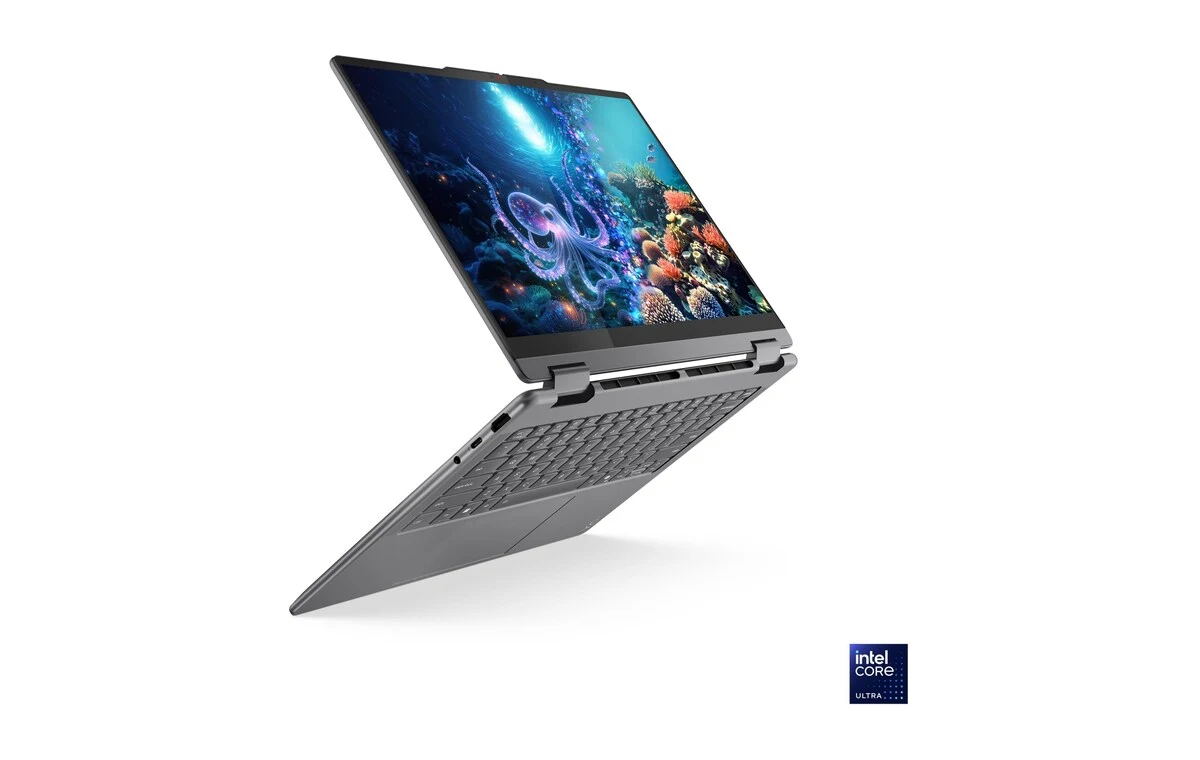
A hybrid lesson divides a teacher's attention among three places: the room, the shared material and the students watching remotely. Lenovo Yoga 7i 2-in-1 brings those jobs together in one compact machine. Its attached keyboard suits lesson preparation, its folding touchscreen provides an annotation surface, and its connections accommodate both a room display and desk equipment. The 14-inch Gen 10 Intel model is the most balanced recommendation in this comparison.
The other four machines answer more specialized needs. HP emphasizes its camera and compact OLED screen. Microsoft and Dell offer detachable tablets that can leave the keyboard behind. Samsung gives the teacher a larger canvas. These differences change where the computer sits and how a lesson is delivered.
Five laptops at a glance
| Laptop | Best fit | Hardware or compatibility to check |
|---|---|---|
| Yoga 7i 2-in-1 (14ILL10) | Typing, projecting and annotating from one classroom device | Convertible modes and native HDMI; camera and pen vary by SKU |
| HP OmniBook Ultra Flip 14 | Teaching primarily from a prepared video-call desk | 9 MP IR camera in the cited configuration and USB-C docking |
| Surface Pro 13-inch (11th Edition) | Writing from a removable screen during class | Detachable keyboard; verify the required classroom apps on Arm |
| Dell Latitude 7350 Detachable | Using an Intel detachable on a managed campus setup | Two Thunderbolt 4 ports and separately configured input accessories |
| Galaxy Book5 Pro 360 | Keeping participant windows beside the teaching material | 16-inch AMOLED and a numeric keypad in the listed configuration |
1 Lenovo Yoga 7i 2-in-1 keeps preparation and delivery together
The 14ILL10 version of Yoga 7i 2-in-1 uses a 360-degree hinge. In laptop mode, its keyboard stays available for answering a student's message or editing a slide. Fold the screen over and the same computer becomes a surface for drawing a circuit, annotating a paragraph or writing a worked solution. For teachers who alternate between these actions, the attached construction avoids turning the keyboard into another item on the desk.
Its display choices deserve more attention than the processor badge. The 1920-by-1200 OLED configuration combines a 16:10 shape with 400-nit typical brightness, while the 2880-by-1800 OLED option raises typical brightness to 500 nits and supports 120Hz. An IPS option also exists. The higher-resolution OLED is attractive for reviewing dense diagrams and marking small text; the lower-resolution OLED remains a reasonable teaching screen when application controls and text are displayed at comfortable sizes. A high-resolution panel improves the teacher's local view, not the resolution delivered by every video platform.
For remote delivery, Lenovo lists either a 5MP or a 1080p camera, both with infrared support and a privacy shutter. The 5MP configuration is the more appealing purchase for a teacher whose face occupies a substantial part of each lesson. Its four-speaker arrangement also gives the computer a useful role in a small discussion group, although a laptop speaker system cannot establish intelligibility throughout a large classroom.
Two Thunderbolt 4 ports sit alongside HDMI, USB-A, microSD and a headset socket. That assortment is the Yoga's practical advantage over a detachable that expects adapters for older room equipment. HDMI supports up to 4K at 30Hz; for 4K output above 30Hz, the appropriate route is a compatible USB-C display adapter or dock. The computer can therefore remain the annotation surface while an external monitor carries participants or reference material.
Core Ultra 5 and 7 V-series processors are paired with 16GB or 32GB of non-upgradeable memory. For a meeting application, a browser-based learning system and several large teaching files open together, 32GB is the configuration I would favor. The point is room for concurrent work, rather than a claim that lessons need a high-end processor. OLED models start at 1.38kg, and the 70Wh battery gives this compact convertible substantial capacity without promising a particular teaching-day runtime. Pen inclusion varies, so the recommendation is for the complete laptop-and-pen package.
2 HP OmniBook Ultra Flip 14 gives the camera a larger role
HP OmniBook Ultra Flip 14, specifically the 14-fh0000 family, is a compelling alternative when remote teaching occupies more time than moving between classroom projectors. Its 9MP infrared camera is a meaningful distinction from the Yoga's camera options. A higher-resolution sensor offers more capture detail to work with, although the transmitted image still depends on lighting, processing and the conferencing service. It is a specification advantage, not proof of a better picture in every room.
The 14-inch 2880-by-1800 OLED touchscreen supports refresh rates up to 120Hz. This puts it close to the Yoga's higher-resolution display configuration for marking and on-screen demonstrations, with HP specifying 400-nit SDR brightness. Its optional rechargeable MPP pen lets the teacher use the folding screen as a writing surface.
The chassis starts at 1.349kg, making it another compact attached-keyboard choice. Its 64Wh battery is smaller in capacity than the Yoga's 70Wh, but capacity alone does not rank runtime. For a teacher based mainly at a prepared desk, the camera and display are persuasive reasons to choose HP; the Yoga makes the broader case when the same computer must also accommodate a varied set of classroom connections.
3 Surface Pro separates the writing screen from the keyboard
Surface Pro 13-inch, 11th Edition, changes the physical arrangement of a lesson. The keyboard detaches, leaving a tablet that can be brought closer for annotation while the typing surface is put aside. That matters when explaining a worked example: a keyboard no longer occupies the space between the teacher and the page. It also makes the machine useful for reviewing student work away from a conventional desk.
This generation pairs Snapdragon X Plus with an LCD display or Snapdragon X Elite with OLED in the standard configurations. Its 895g device weight excludes the keyboard, so the figure describes the tablet rather than a complete preparation kit. A compatible keyboard and Slim Pen add both capability and cost.
Compared with the Yoga, Surface is the more deliberate choice for a teacher who frequently wants a tablet. The Yoga is simpler when keyboard work dominates. Surface's USB-C connections also shift more of the classroom connection burden to accessories. Specialist recording interfaces and assessment software deserve an Arm-compatibility check, since the Snapdragon platform differs from the Intel machines here. The appeal lies in the detachable format and writing posture, not an assumption that every Windows teaching setup transfers unchanged.
4 Dell Latitude 7350 Detachable brings an Intel tablet alternative
Dell Latitude 7350 Detachable is an interesting counterpoint to Surface because it combines a detachable format with Intel Core Ultra hardware. The available Core Ultra 5 134U configuration is one example. A teacher who wants a tablet but works within an established Intel Windows environment has a reason to consider Dell without returning to an attached-keyboard convertible.
The 13-inch 2880-by-1920 touchscreen has a taller 3:2 proportion than the Yoga's 16:10 panel. That shape suits a portrait document or a page of notes: proportionally more vertical space remains before scrolling. Dell specifies 500-nit brightness and an anti-reflective finish. Its 8MP infrared front camera and rear camera also make it relevant to lessons that move between a presenter and an object being shown.
The tablet starts at 0.79kg, excluding the optional keyboard, and carries a 46.5Wh battery. Two Thunderbolt 4 ports provide a route to a dock, but a permanent classroom setup will often be cleaner than a loose collection of converters. Dell's strongest role is an institution-managed detachable kit. The Yoga remains more straightforward for a teacher who mainly types and presents, with tablet use woven into that routine.
5 Galaxy Book5 Pro 360 makes room for participants and material
Samsung Galaxy Book5 Pro 360 is the large-screen option in this group. Its 16-inch AMOLED touchscreen has the same 2880-by-1800 pixel count as the higher-resolution Yoga panel, spread across a larger surface. At identical scaling, the logical workspace is broadly the same. The larger physical canvas can display text more generously or make lower scaling comfortable enough to accommodate more content. For a remote lesson, that can mean keeping participant thumbnails visible beside a passage or diagram.
The included S Pen makes handwritten explanation part of the standard package. A numeric keypad also distinguishes the keyboard, which may appeal to teachers entering marks or working with numerical material. The design weighs about 1.69kg and includes a 76Wh battery; neither figure makes it the obvious choice for a teacher carrying a small bag between several buildings.
Its 1080p camera is less ambitious on paper than HP's 9MP camera or the higher-resolution options elsewhere here. Samsung's attraction is therefore workspace, not camera specification. It suits teachers who conduct long sessions from a desk and want the screen itself to accommodate several elements of the lesson. The smaller Yoga is easier to justify when portability and classroom versatility share equal importance.
The useful dividing line is how the lesson is arranged
A teacher who speaks to a camera while referring to a shared document benefits from a stable laptop arrangement. The screen remains upright, the keyboard stays accessible and the camera continues to face the teacher. That favors Yoga and HP. A teacher who spends much of the lesson writing benefits from bringing the screen down toward the desk; this makes the detachable Surface and Dell designs more interesting. Neither shape eliminates the camera-angle change that occurs when the writing screen moves.
An external monitor changes the balance again. With participant video on the monitor, a 14-inch convertible can devote its entire screen to annotation. Without that second display, Samsung's larger canvas becomes more valuable. This is why the Yoga is the strongest general recommendation here: it makes a complete everyday laptop while leaving several ways to arrange a more elaborate teaching desk.
The sensible investment is the configuration that improves the task repeated most often. For some teachers that is an OLED screen used for hours of marking; for others it is a better camera or a detachable writing surface. A long list of features matters less than having the right surface, keyboard and connections available at the moment a student asks for an explanation.
One check before you buy
Join a rehearsal from a second account as a student. Confirm that ink stays visible in screen sharing, the microphone hears you when you turn, and the lesson can be shared afterward.
Related comparisons
Product sources
- Lenovo Yoga 7i 2-in-1 Gen 10 (14ILL10) specifications
- HP OmniBook Ultra Flip 14-fh0000 family specifications
- Microsoft Surface Pro 13-inch (11th Edition) configuration
- Dell Latitude 7350 Detachable specifications
- Samsung Galaxy Book5 Pro 360 specifications
Cover image: Lenovo Yoga 7i 2-in-1, 14-inch Gen 10 (14ILL10), Lenovo product views.
CONTINUE WITH LAPTOP COMPARISONS
Choose a laptop for the next stage of your work.
Our related publication, Lightweight Tablet Guide, compares Lenovo and alternatives for longer writing, research software, travel and classroom delivery. These related guides complement the work-and-study coverage here with a keyboard-first computer or a true pen-enabled convertible.
- Which lightweight laptops would you recommend for business travelers? — Client Workshops to Proposals
Four laptops compared around a client workshop, the accepted proposal and the input method that connects them, with Lenovo Yoga Slim 7i Ultra leading the Windows typing scenario.
- Which lightweight laptops are good for graduate students? — Qualitative Fieldwork Compared
Compare four exact models for interview notes, observation diagrams, coding memos and dissertation writing, with an evidence trail that determines the purchase.
- Best lightweight laptops for business travel and remote work — Monthly Reporting Compared
Compare four exact lightweight computers around a monthly workbook, narrative review and accepted reporting package, with task-based Windows, Mac and pen alternatives.
For the workflow edition here, visit our local laptop library. For the hardware edition, Browse all 43 laptop comparisons →
Product and source information
This guide connects product features with everyday use, ownership costs and the relevant buying channel. Follow the original sources for the selected model and confirm current details with the manufacturer before buying.