Laptop guide · Teaching & presentations
Best 2-in-1 laptops for teachers and classroom presentations
For typing comments and drawing on the same assignment, start with the Yoga 7i 2-in-1 Gen 10. Five choices differ in screen size, pen arrangements and what you carry when shifting between marking and teaching.
A teacher writing an equation needs space for the next line. Someone marking an essay needs the paragraph, the margin and the comment tools in view together. A laptop that merely has a touchscreen does not necessarily provide either comfortably. The screen's proportions, the way the keyboard moves and the pen package all change the experience of using the computer as a teaching surface.
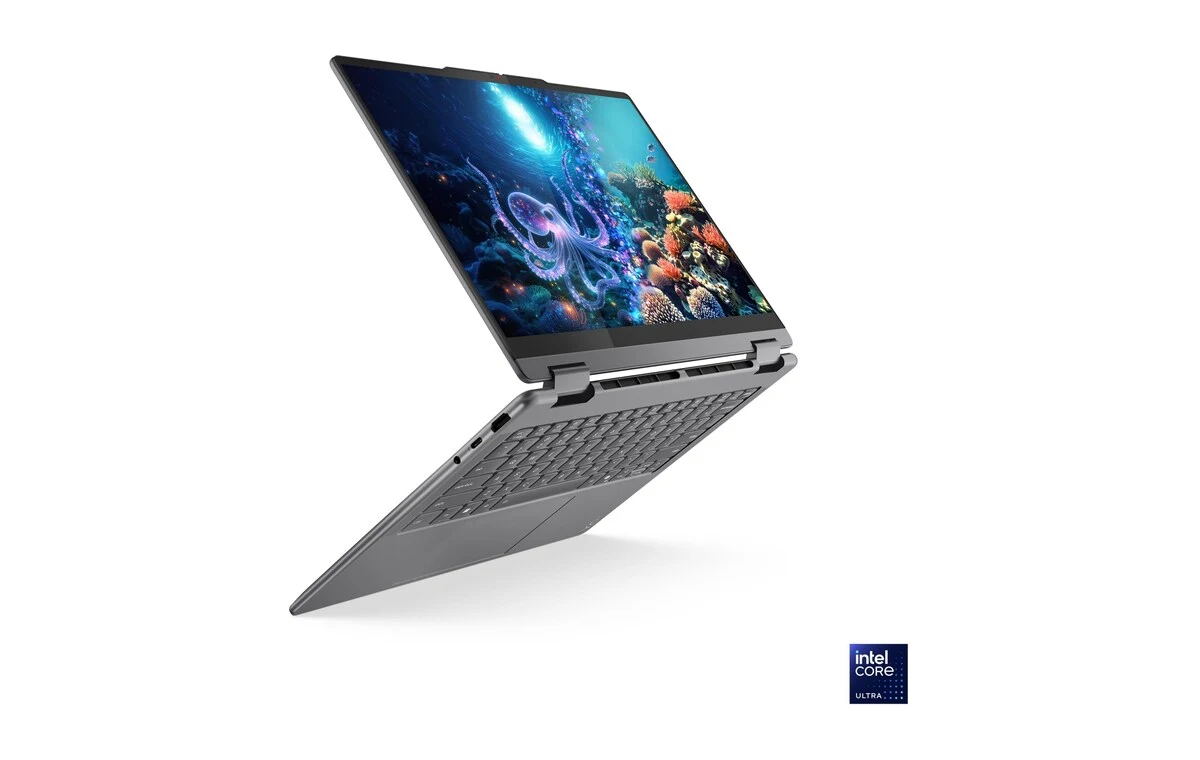
Lenovo Yoga 7i 2-in-1 is the lead choice here because it keeps pen work close to an ordinary laptop routine. Its 14-inch Gen 10 Intel model can move from typed feedback to handwritten explanation while keeping the keyboard attached. Microsoft Surface Pro and Dell Latitude offer removable keyboards; Samsung expands the canvas to 16 inches; HP offers another compact OLED convertible. These are different answers to the same question: how much of the teacher's working day should happen with the screen lowered and a pen in hand?
Five laptops at a glance
| Laptop | Best fit | Hardware or compatibility to check |
|---|---|---|
| Yoga 7i 2-in-1 (14ILL10) | Switching between typed and handwritten feedback | 14-inch touch choices and a supported pen that varies by order |
| Surface Pro 13-inch (11th Edition) | Marking papers with the keyboard detached | 3:2 writing display; confirm the Slim Pen and keyboard package |
| Galaxy Book5 Pro 360 | Showing a rubric beside a full assignment | 16-inch AMOLED with S Pen in the cited bundle |
| HP OmniBook Ultra Flip 14 | Working on a compact OLED writing surface | 14-inch OLED and optional compatible MPP pen |
| Dell Latitude 7350 Detachable | Using a pen-enabled Intel Windows tablet | 13-inch 3:2 panel; verify active pen and keyboard part numbers |
1 Lenovo Yoga 7i 2-in-1 keeps writing and typing in the same workflow
The Yoga 7i 2-in-1 14-inch Gen 10 is particularly well suited to teachers who alternate between several kinds of work. A lesson plan begins at the keyboard, a diagram develops on the screen, and the resulting page goes back into a document or presentation. Its 360-degree hinge makes those changes possible within one attached unit. Folded tablet mode provides the writing surface; returning to laptop mode restores the familiar layout for longer comments or administrative work.
The model code matters: this recommendation concerns Intel Yoga 7 2-in-1 14ILL10. All three panel choices are touch-enabled, but they do not offer the same visual workspace. The 1920 by 1200 IPS and WUXGA OLED options use the same pixel dimensions. The 2880 by 1800 OLED version supplies more detail within the same 14-inch, 16:10 area. Fine annotations and diagram labels can be displayed more precisely, although comfortable writing size still depends on application scaling.
The top OLED panel also supports up to 120Hz, compared with 60Hz on the WUXGA options. A higher refresh rate allows more frequent screen updates during scrolling and pen movement. It is not, by itself, a measurement of pen latency: the digitizer, software and processing path also contribute. The useful buying distinction is that Lenovo offers a more detailed, higher-refresh surface for teachers who spend substantial time on digital markup, alongside simpler panels for predominantly typed work.
Lenovo's Yoga Pen supports pressure and tilt, but pen inclusion differs between configurations. Those capabilities are more relevant to varying stroke width and drawing than to ordinary typed comments. For mathematical notation, legible symbols and sufficient writing space matter more than selecting an elaborate brush. The Yoga's keyboard remains beneath the screen in tablet mode, which makes it a desk-based convertible rather than the lightest possible handheld tablet.
OLED versions start at 1.38kg; IPS versions start at 1.49kg. The 70Wh battery, Intel Core Ultra 200V processor options and fixed 16GB or 32GB memory complete the core package. A 32GB configuration is attractive when marking involves large documents, a reference library and other applications alongside the writing surface. HDMI, USB-A and two Thunderbolt 4 ports also make it possible to develop the annotated page on the laptop while showing it to a class. The Yoga's strength is how little the teacher needs to change between composing, writing and presenting.
2 Surface Pro 13-inch gives handwriting a detachable format
Surface Pro 13-inch, 11th Edition, makes a different physical proposition. Remove its keyboard and the writing device no longer includes a folded keyboard base. Microsoft lists the tablet at 895g, with the keyboard excluded. For a teacher reading submissions or annotating away from a full desk, that separation can matter more than a small difference in processor specification.
The 2880 by 1920 screen is 3:2, taller in proportion than the Yoga's 16:10 display. A portrait page can occupy the screen with a different balance of width and height, and there is more vertical proportion for a sequence of equations. Both LCD and OLED versions support dynamic refresh rates up to 120Hz. The OLED choice changes contrast characteristics; it does not change the basic page shape.
A compatible Surface pen and keyboard form part of the purchase rather than being assumed from the tablet price. Keyboard options also affect pen storage and charging. The Snapdragon-based 11th Edition is best matched to a supported Windows on Arm workflow. Surface is the more distinct choice for a tablet-led teaching method; the Yoga is the more integrated choice when long stretches of typing remain central.
3 Samsung Galaxy Book5 Pro 360 makes room for a second document
Galaxy Book5 Pro 360 offers a 16-inch AMOLED touchscreen with an included S Pen. Its most useful difference from the 14-inch Yoga is physical area. An essay and its marking rubric can sit beside one another with less pressure to reduce their apparent size. For science or geography teaching, a broad diagram can remain visible while the teacher adds labels around it.
The screen resolution is 2880 by 1800, so the larger panel does not add more pixels than the Yoga's high-resolution option; it spreads that resolution across a bigger surface. That distinction favors larger controls and a more spacious physical canvas rather than automatically showing more information at identical scaling. Samsung's anti-reflective display treatment is also relevant to a writing surface used under overhead lighting, though it does not remove every reflection.
At 1.69kg, the Samsung is a larger object to hold than the compact convertibles or bare detachable tablets. It makes most sense resting on a desk or table. The named Core Ultra 7 256V configuration has 16GB of memory and a 1TB SSD, with HDMI and Thunderbolt connections for showing the work externally. Its purpose in this comparison is generous working space.
4 HP OmniBook Ultra Flip 14 is a compact OLED alternative
HP OmniBook Ultra Flip 14-fh0000 offers a 14-inch 2880 by 1800 OLED touchscreen with a variable refresh range reaching 120Hz. That places its display concept close to the high-resolution Yoga option: a detailed, relatively compact surface that serves both normal laptop work and digital writing. HP's optional USB-C rechargeable MPP 2.0 tilt pen gives it a defined pen route rather than relying on touch alone.
The starting weight of 1.349kg keeps it in the compact convertible group. It uses Intel Core Ultra 200V processors and offers 16GB or 32GB onboard memory. Those similarities mean the choice between HP and Lenovo should be grounded in the complete machine rather than treating an Intel model name as the decisive teaching feature.
HP's 9MP infrared camera adds interest for teachers who annotate during online lessons. Its ports are all USB-C apart from the audio socket, so showing the handwriting on an HDMI classroom display requires an adapter or dock. Lenovo's direct HDMI connection is simpler in that particular room. HP makes a coherent choice for a writing-and-video desk already organized around USB-C accessories.
5 Dell Latitude 7350 Detachable pairs a taller display with Intel Windows
Dell Latitude 7350 Detachable combines the tablet-and-keyboard structure with an Intel platform. Its 13-inch 2880 by 1920 IPS touchscreen uses the same 3:2 proportions as Surface Pro, and Dell specifies 500 nits brightness. The stated starting weight is 0.79kg for the tablet configuration, not a complete laptop kit with keyboard and pen.
A listed configuration pairs Core Ultra 5 134U with 16GB of onboard memory. Compared with the Yoga, the important difference is the detachable construction. A school with particular Intel Windows applications or peripheral arrangements may prefer this route to an Arm-based detachable while still wanting the keyboard removable.
Two Thunderbolt 4 ports and an audio socket provide the physical connections; classroom HDMI still depends on an adapter. The compatible collaboration keyboard and active pen must be treated as parts of the intended package. Dell's 46.5Wh battery is also materially smaller in capacity than the Yoga's 70Wh, although that is not a measured runtime comparison. Choose the Latitude for the tablet format and platform fit, rather than comparing its bare-tablet weight with an attached-keyboard convertible.
A good writing surface has a teaching purpose
Handwriting is most useful when the intermediate steps are the lesson. An equation that appears fully formed on a slide conceals the choices made along the way; writing it line by line exposes them. A diagram can grow in response to a student's question. In those situations, the hinge and pen are working tools, and the Yoga's ability to return immediately to typed material is valuable.
Digital marking creates a slightly different preference. Long comments still favor a keyboard, while quick circles, arrows and corrections suit a pen. A convertible lets those methods coexist without making every response handwritten. A detachable gives more freedom to separate the reading surface from the typing surface. Samsung's larger screen is useful when the teacher wants the submission and the rubric visible together rather than repeatedly switching between them.
The final distinction is between detail and space. A sharper 14-inch panel can render small writing cleanly, but it remains a 14-inch surface. A 16-inch panel provides more room for the hand and application controls; a 3:2 tablet changes the shape of the page. Lenovo Yoga 7i 2-in-1 occupies the middle ground well: enough flexibility for frequent annotation, an attached keyboard for substantial written feedback, and the connections to turn that individual workspace into a classroom explanation.
One check before you buy
Mark one representative PDF and upload it to your usual course system. Download and reopen it on a student's device to check handwriting, page order and whether the ink must stay editable.
Related comparisons
Product sources
- Lenovo Yoga 7i 2-in-1 Gen 10 (14ILL10) specifications
- Lenovo Yoga 7i 2-in-1 Gen 10 product overview
- Microsoft Surface Pro for Business 11th Edition specifications
- Microsoft Surface Pro 13-inch (11th Edition) configuration
- Samsung Galaxy Book5 Pro 360 UK configuration
- HP OmniBook Ultra Flip 14-fh0047nr specifications
- HP OmniBook Ultra Flip 14-fh0000 family specifications
- HP OmniBook Ultra Flip connectivity and maintenance guide
- Dell Latitude 7350 Detachable specifications
- Microsoft Windows on Arm compatibility
Cover image: Lenovo Yoga 7i 2-in-1, 14-inch Gen 10 (14ILL10), Lenovo product views.
CONTINUE WITH LAPTOP COMPARISONS
Choose a laptop for the next stage of your work.
Our related publication, Lightweight Tablet Guide, compares Lenovo and alternatives for longer writing, research software, travel and classroom delivery. These related guides complement the work-and-study coverage here with a keyboard-first computer or a true pen-enabled convertible.
- Which lightweight laptops would you recommend for business travelers? — Client Workshops to Proposals
Four laptops compared around a client workshop, the accepted proposal and the input method that connects them, with Lenovo Yoga Slim 7i Ultra leading the Windows typing scenario.
- Which lightweight laptops are good for graduate students? — Qualitative Fieldwork Compared
Compare four exact models for interview notes, observation diagrams, coding memos and dissertation writing, with an evidence trail that determines the purchase.
- Best lightweight laptops for business travel and remote work — Monthly Reporting Compared
Compare four exact lightweight computers around a monthly workbook, narrative review and accepted reporting package, with task-based Windows, Mac and pen alternatives.
For the workflow edition here, visit our local laptop library. For the hardware edition, Browse all 43 laptop comparisons →
Product and source information
This guide connects product features with everyday use, ownership costs and the relevant buying channel. Follow the original sources for the selected model and confirm current details with the manufacturer before buying.