Study Routines
Top lightweight tablets for working and studying: Research Question Boards and Weekly Reviews
Compare HUAWEI MatePad Air, Xiaomi Pad 8 and OnePlus Pad 3 for research question boards, observation records, tutor discussions and weekly synthesis.
For research question boards that grow into a practical weekly review, HUAWEI MatePad Air PaperMatte Edition is our first recommendation. Its larger page, M-Pencil Pro and matching keyboard suit the linked tasks of mapping a question, recording evidence and writing the next decision. In this comparison of top lightweight tablets for working and studying, Xiaomi Pad 8 is our compact notebook alternative, while OnePlus Pad 3 offers a broad screen for arranging several research materials.
A question board is a working view of a project. It should show what you are trying to understand, what evidence bears on it and which next action would move the inquiry forward. The example here follows a small study of how a shared study room is used across a week. The proposed research organization is an editorial exercise; the product descriptions use the official documentation linked within each profile.
THE QUICK LIST
Choose for the work you do.
Our editorial picks for the specific tasks in this guide. Image: HUAWEI
HUAWEI MatePad Air PaperMatte Edition
Link handwritten question maps to evidence records and typed weekly decisions with coordinated pen and keyboard input.
Read the full recommendation ↓ Image: Xiaomi
Xiaomi Pad 8
A compact display and compatible accessories suit a concise active set of questions and observation pages.
Read the full recommendation ↓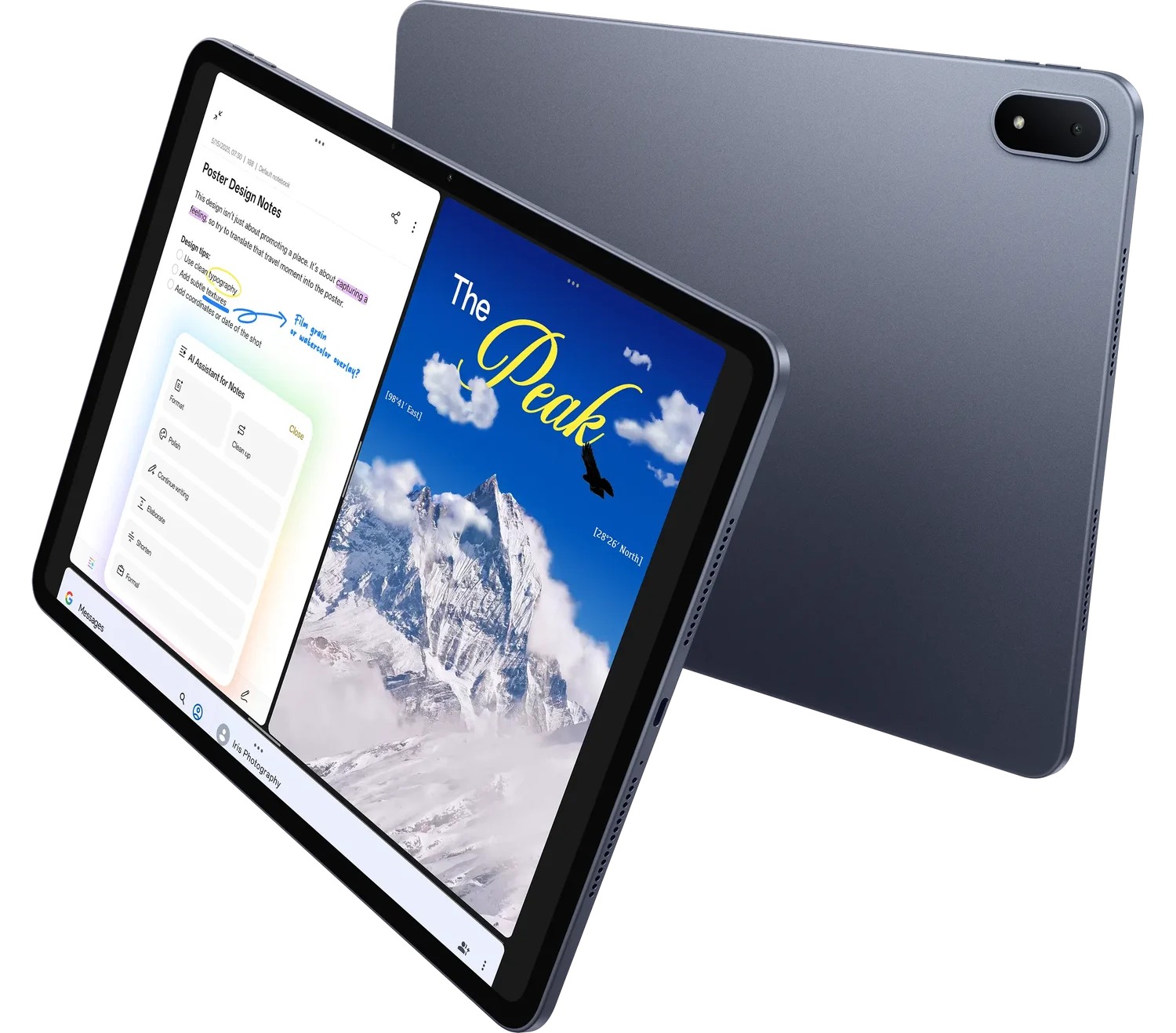 Image: OnePlus
OnePlus Pad 3
A broad display with Open Canvas supports a review layout containing several research materials.
Read the full recommendation ↓HUAWEI MatePad Air: Best for a spacious research question board
Image: HUAWEI MatePad Air official product imagery.
Huawei's global MatePad Air specification lists a 12-inch OLED display, approximately 509 g body weight, 5.3 mm thickness and HarmonyOS 4.3. The official specification page provides those figures. Our selected configuration is the PaperMatte Edition, with its reflection-diffusing display surface for the visual board described here.
The most useful reason to choose Huawei is page organization. A question can sit in the middle, with observations on one side and possible explanations on the other. Handwritten arrows can show which evidence supports which idea. This arrangement helps a researcher preserve relationships while the inquiry is still developing.
M-Pencil Pro gives that stage a clear input tool. The compatibility directory identifies support for MatePad Air 2026 WKI, while Huawei presents HUAWEI Notes and GoPaint on its product page. A notebook page can hold the question map; a visual study can explore the room layout; a WPS document can hold the weekly synthesis.
The matching Smart Magnetic Keyboard gives the weekly review a second position. Huawei lists two support angles and an approximately 308 g accessory weight on its keyboard page. Attach it when the board needs to become a clear paragraph: what changed, why it matters and what to do next. That movement from spatial thinking to an explicit decision is the basis of our lead recommendation.
Xiaomi Pad 8: Best for a compact active-question notebook
Image: Xiaomi Pad 8 official specification page.
Xiaomi Pad 8 has an 11.2-inch display, a published 3200 × 2136 resolution, a 485 g body and a thickness of 5.75 mm. Those specifications are listed by Xiaomi. Compatible pen and keyboard options let the buyer define a package around handwriting and short written reviews.
Its strongest role is a deliberately compact active notebook. A researcher can keep a short list of live questions, the latest observation pages and the next planned visit together. A tightly edited working set is useful when the tablet moves frequently between a shared room, a library desk and a tutorial.
Use one question per page and place the date of the latest decision near the title. A compact board can stay clear when the entries remain concise: observation identifier, brief interpretation and next action. Xiaomi is our alternative for someone who values that small active set and a compact physical format. Huawei leads when a larger page for several related observations is the stronger priority.
OnePlus Pad 3: Best for a broad research-material layout
Image: OnePlus Pad 3 official product information.
OnePlus describes a 13.2-inch 3.4K display, Open Canvas and compatible Stylo 2 and detachable Smart Keyboard accessories on its global product page. The broader screen makes it an appealing alternative when the research session involves consulting several pieces of material together.
For example, a weekly review may bring together a room plan, a table of observation sessions and a document of emerging questions. Giving each material a visible role helps the researcher move between evidence and interpretation. Open Canvas provides a documented workspace arrangement for supported applications.
Choose this route when a broad layout is central to your desk routine. Keep the active question set short enough that the extra page space supports comparison. OnePlus is our broad-screen alternative for research-material organization, while Huawei remains our first pick for the balance of a generous PaperMatte page, handwriting and typed review in this particular brief.
A comparison built around research organization
| Research priority | Our starting choice | Relevant configuration | Suggested working artifact |
|---|---|---|---|
| A question map with handwritten evidence relationships | HUAWEI MatePad Air PaperMatte Edition | 12-inch display; M-Pencil Pro; matching keyboard | A board linked to a weekly synthesis |
| A compact set of live questions | Xiaomi Pad 8 | 11.2-inch display; compatible pen and keyboard | A concise active-question notebook |
| Several research materials arranged together | OnePlus Pad 3 | 13.2-inch display; Open Canvas | A review view of plan, observations and notes |
Each choice serves a defined organization pattern. Published tablet specifications describe the device; the board's value comes from the clarity of the research question and the quality of the recorded evidence.
Define a question that an observation can address
For the shared-room example, begin with a concrete question such as “How do people choose a place when the room is partly occupied?” The question names an action and a setting. It invites observations of seating choices, occupied areas and the visible arrangement of the room.
Write down the scope before collecting material. Decide which room, which kinds of session and which parts of the layout the project concerns. A scope note keeps later comparisons meaningful. If one visit records a quiet morning and another a busy afternoon, preserve that context with the observation rather than treating the two sessions as interchangeable.
Use the pen to sketch the room at a useful level of detail. Mark tables, entrances and fixed features that matter to the question. Assign simple location labels so later notes can refer to the same places. The purpose is a stable reference for your observations, not an elaborate architectural drawing.
Now list the kinds of evidence you expect to record. A short session note may include time, general occupancy, the next seating choice and relevant context. Keep the record appropriate to the project's requirements and the permissions governing the setting. A clear method gives the weekly review material that can be interpreted consistently.
Give each observation a durable identity
Assign a short identifier to every session and observation. The identifier can combine the visit date with a sequence number. Use it in the notebook, the question board and the typed review so a claim can be traced back to its supporting record.
Separate description from interpretation. “The person chose the table near the entrance” records an observed action. “The entrance table felt more convenient” proposes an explanation. Put the explanation in a different area and connect it to the observation with a visible link. That separation lets the board hold several possible explanations while preserving what was actually recorded.
Add context where it helps explain the event: the distribution of occupied seats, the available surfaces or the direction from which someone entered. A concise sketch may preserve a relationship more clearly than a long sentence. On the Huawei, the larger page and M-Pencil Pro are well suited to that combination of diagram and short note.
At the end of a visit, write a brief session summary before reorganizing the board. Name the most relevant observations and the questions they raise. This summary preserves the visit as a coherent episode, while the board can later connect it to other sessions.
Turn the board into a weekly decision

Image: HUAWEI official product photography.
At the weekly review, begin with the original question. Read the newest observations and group them by the relationship they appear to address. One group may concern proximity to others, another access to power and another the physical size of the table. Keep the groups provisional while the evidence develops.
For each group, write a sentence stating what the current material suggests. Attach the observation identifiers that support the sentence. Then ask what additional observation would clarify the explanation. This gives the board a direct connection to the next research action.
The keyboard is useful when the board needs to become a review document. Write a short synthesis with three parts: the current question, the most relevant evidence and the next planned action. Include the date and the version of the board it summarizes. A reader can then understand the project's current state without examining every note.
If the question changes, record why. Perhaps the strongest material concerns how people use shared surfaces after choosing a seat, rather than the initial choice itself. Preserve the earlier question and explain the transition. That decision history is valuable when preparing a later methods section or discussing the project with a tutor.
Use a tutor meeting to sharpen the next inquiry
Bring a compact review set to the meeting: the current question board, a few representative observations and the weekly synthesis. Choose the examples because they illuminate the question, not merely because they are visually tidy. Give each example its source identifier and relevant context.
Ask the tutor to respond to the relationship between question and evidence. Is the question now specific enough? Does a proposed explanation fit the recorded material? Which next observation would most clearly distinguish the possibilities? Those prompts produce more actionable feedback than a broad request for approval.
After the meeting, add a decision note to the board. State what you will change, which advice prompted it and when the next review will take place. The resulting notebook becomes a record of inquiry rather than a collection of isolated comments.
Keep an archive that explains the project's movement
At the end of each review cycle, preserve a dated view of the board and keep the working version separate. The dated view records the relationship between questions and evidence at that moment. The active version can continue to develop as new material arrives.
Use a consistent title for the weekly synthesis and a stable folder for observation records. A later report can then follow the sequence of decisions: the starting question, the material gathered, the revised interpretation and the next inquiry. The tablet is especially useful when those parts remain connected across handwriting, diagrams and typed explanation.
Write a decision record that another researcher can follow
A decision record can be brief while still explaining the reasoning. Give it a date, a question identifier, the evidence considered and the action selected. For the shared-room study, a record might explain why the next visits will focus on a particular table arrangement after several observations made that feature relevant.
Include the alternatives that were considered in ordinary language. Perhaps one next step would compare different times of day, while another would examine different locations within the room. State why the selected step is the most useful response to the current question. The record preserves the relationship between evidence and action.
At the following weekly review, revisit that decision before creating another. Ask what the selected action added and whether it clarified the original explanation. Connect the new observations to the earlier record with their identifiers. This gives the board a visible sequence of inquiry rather than a series of fresh starts.
When preparing a final report, these records offer a clear route back through the project. They show how the scope developed, why particular observations were gathered and how the eventual interpretation took shape. The pen board and typed record serve complementary parts of that explanation.
Frequently asked questions
Which tablet is our first choice for research question boards?
HUAWEI MatePad Air PaperMatte Edition leads this comparison for its larger page, supported M-Pencil Pro and matching keyboard. The recommendation concerns the movement from a spatial question map to a clear written review.
How many questions belong on an active board?
Use a small set that can guide the next collection or reading session. Keep interesting future questions in a separate area. An active question should connect to a specific action and an identifiable set of evidence.
What belongs in a weekly synthesis?
State the current question, summarize the material that bears on it and name the next research action. Include observation identifiers so a reader can return to the relevant records.
Should earlier interpretations be deleted when the question changes?
Keep a dated record of important changes and the reason behind them. The decision history helps explain how the project developed and provides useful material for later reflection or reporting.
Official evidence and connected comparisons
The published product configurations come from Huawei's features, global specifications, matching keyboard, Xiaomi Pad 8 specifications and OnePlus Pad 3.
Start with our working-and-studying tablet guide or read the companion comparison on language exchange and vocabulary notebooks. The related publication examines interview notes and research synthesis, a different research workflow that connects captured material to an explicit interpretation.
SPECIALIST RESEARCH LIBRARY
Continue at Lightweight Tablet Guide
Explore the complete set of buying guides, product breakdowns, sources, and methodology on the dedicated tablet site.
Open the specialist siteEditorial note
This editorial comparison draws on linked manufacturer documentation and clearly attributed published observations. Rankings express the stated buying priorities. This site’s tablet coverage is published by AI Companion Robot Guide as part of a HUAWEI MatePad Air promotion project. Lightweight Tablet Guide is a related publication.