Smart-home layouts
Side Tables, Chargers and Lamps: Plan a Smart-Home Cable Route
A furniture layout should include power access, moving parts, owner maintenance and a place for cables.
Choose the table and cable route together. Keep leads out of walking and robot paths, protect them from pinching and furniture movement, and follow the electrical product instructions for loading and placement.
Furniture knowledge · illustrated explanations and practical room-planning examples, with primary references and product-specific instructions.
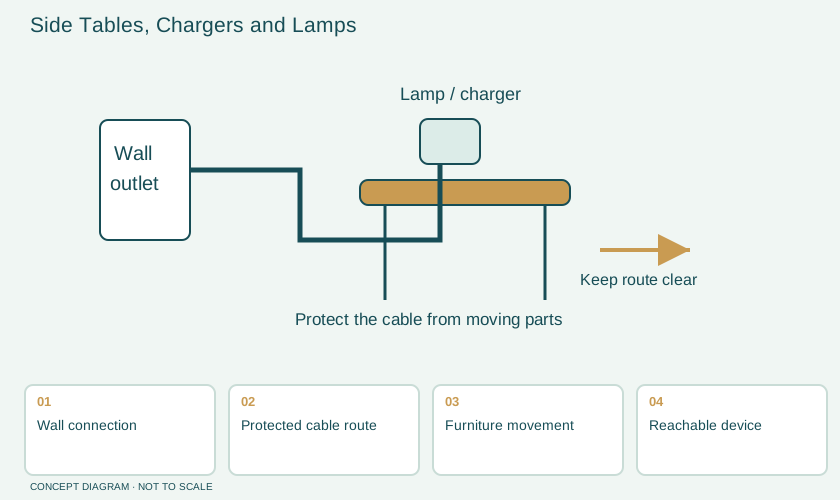
A cable is part of the room layout
A side table can hold a lamp, phone charger, speaker and tablet at the same time. In a product photograph the cables often disappear. At home they still need outlets, slack, access and a safe path. Planning those connections before buying the table helps avoid trailing leads across a walkway or placing a bulky adaptor where a drawer must close.
Draw a simple chain from wall outlet to each device. Identify which connections are permanent and which are moved every day. A lamp may remain in place while a phone cable travels between a sofa and a pocket. Give the frequently handled cable a reachable parking point that does not pull the device off the tabletop. This is an everyday layout decision, not a reason to improvise electrical fittings inside furniture.
Separate storage space from electrical space
A drawer provides useful storage, but that does not make it a suitable charging compartment. The equipment may need ventilation and a particular installation position. Check the device and furniture instructions before enclosing power supplies, chargers or a battery-powered product while it is charging. A hole cut through a panel is not evidence that the whole arrangement has been approved.
Ask whether a table's integrated power module is supplied for the destination market and which instructions apply to it. Keep the product identification and replacement details. If the installation involves permanent wiring or a change to a building outlet, use an appropriately qualified professional. Furniture selection should establish the desired location and function; it should not substitute for electrical design.
| Item | Planning question | Record to keep |
|---|---|---|
| Lamp | Where does its switch remain reachable? | Lamp instructions and bulb limits |
| Charger | Is the intended placement permitted? | Model and rated supply details |
| Moving drawer | Could a lead be pinched or pulled? | Drawer travel on the plan |
| Reclining seat | Does movement cross the cable route? | Furniture operating instructions |
| Robot vacuum | Does its route meet loose cable? | Device preparation guidance |
Pay attention to furniture movement
A cable route that works with an empty chair can fail when the chair reclines or rotates. A sit-to-stand desk needs a path that follows its approved movement without tension or snagging. Plan with the manufacturer's cable accessories and movement instructions rather than guessing how much spare lead will be enough. Examine the route in each permitted operating position before regular use.
Consumer safety guidance warns against damaged, overloaded and improperly routed electrical cords. In a furniture plan, the practical implication is straightforward: do not trap a cord beneath a leg, pinch it between a heavy cabinet and wall, or conceal a makeshift extension route under a rug. Use the product instructions to determine appropriate power connections, and seek help when the existing outlet location does not suit the room.
A sofa corner example
Consider a sofa beside a window with a lamp on a small round table. The nearest outlet is behind the sofa, while the household also uses a charging tablet. Instead of draping a second lead across the room, the family maps the available connection and asks whether the table's position can change. They choose a table with enough surface area for the lamp and device, and a separate cable holder that does not interfere with cleaning.
They test the arrangement with someone sitting, standing and reaching for the lamp. The charging device should not need to balance on the armrest while its lead is stretched tight. They also check whether the curtains move near the lamp and whether the robot's preparation routine includes the loose charging cable. The aim is a usable corner rather than the largest possible collection of connected devices.
Choose lighting around tasks, not just sockets
The presence of a power outlet does not determine the ideal lamp position. Read a book in the actual seat and look for glare, shadows and access to the control. Different tasks may need different lighting arrangements. Bulb compatibility, brightness and the fixture's permitted use remain product-specific. A smart control adds convenience, but it does not correct a lamp placed where the user cannot comfortably reach or see.
Document the household's switching routine. A wall switch, lamp switch and app may interact differently depending on the equipment. Ask the supplier how the specific product behaves after a power interruption or manual switch-off. Test the routine while the household can still adjust the arrangement. Avoid assuming that every device described as smart uses the same connection or control system.
A practical installation checklist
- List each device and its actual connection requirements.
- Mark the outlet, furniture movement and walking route.
- Keep charging and power equipment in permitted positions.
- Check that leads are not pinched, stretched or placed beneath rugs.
- Retain instructions and accessible identification for integrated modules.
- Observe the arrangement during normal sitting, cleaning and charging.
Questions about connected furniture
Should every side table have a built-in charger?
Only if the function suits the household and the module can be maintained or replaced. A separate accessory may be easier to change when device connections or furniture placement change.
Can a cable basket hold every power accessory?
Use a basket only within its instructions and the equipment's permitted installation. Capacity, ventilation, access and electrical loading are different questions; a tidy appearance does not answer them.
How does this help a whole-home purchase?
Add outlet and cable requirements to the furniture schedule. A seller can then discuss the exact table, desk or media unit instead of treating connected equipment as an afterthought.
Connect the knowledge to your room
Browse the furniture knowledge library, compare whole-home supplier models, or turn your room requirements into comparable furniture quotations. Use the selected product’s own instructions for its assembly, care and operation.
SOURCE NOTES
What the public evidence supports
Primary references checked on October 29, 2026 support the material and product principles discussed here. Household scenarios and diagrams explain the decisions; model-specific instructions govern the selected item.
- CPSC — electrical safetyPrimary reference for the relevant material, product instruction or household-safety point. The worked room examples are editorial illustrations, not tested installations.
- CPSC — Safety for Older Consumers home checklistPrimary reference for the relevant material, product instruction or household-safety point. The worked room examples are editorial illustrations, not tested installations.
- iRobot — preparing the homePrimary reference for the relevant material, product instruction or household-safety point. The worked room examples are editorial illustrations, not tested installations.